PSPad editor怎么设置插入模式光标为区块

 时间:2024-10-13 10:36:36

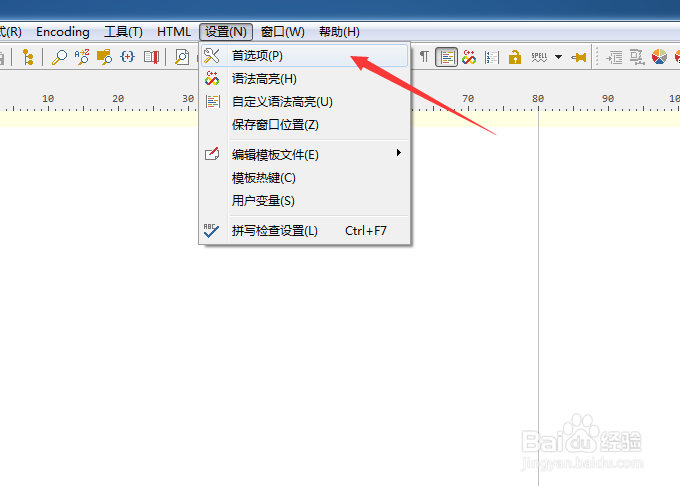
1、点击菜单中的设置菜单

PSPad editor怎么设置插入模式光标为区块

2、弹出了下拉菜单选中为首选项

PSPad editor怎么设置插入模式光标为区块

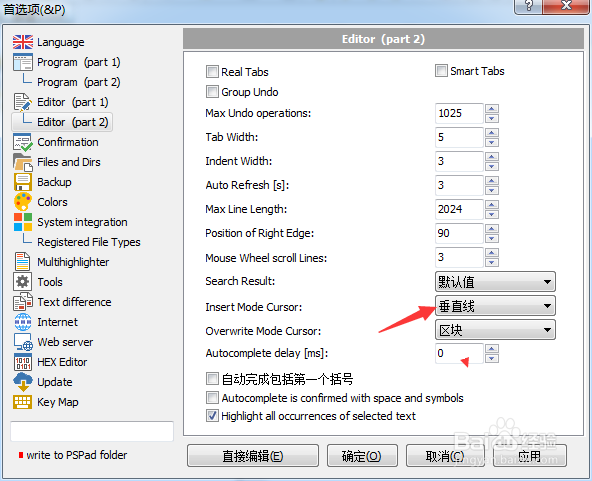
3、点击左侧中editor选项

PSPad editor怎么设置插入模式光标为区块

4、点击insert mode cursor选项

PSPad editor怎么设置插入模式光标为区块

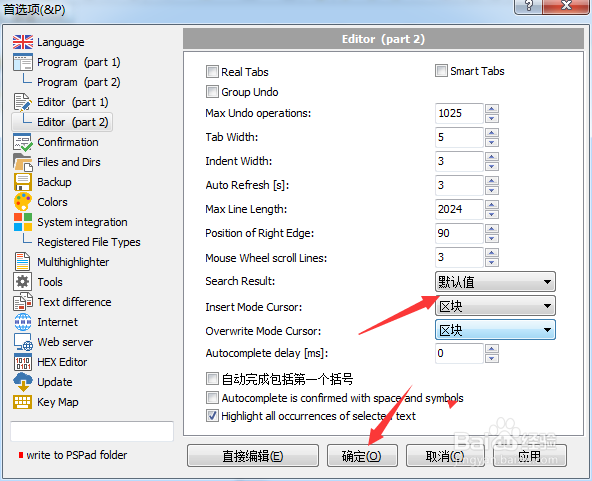
5、弹出了选择为区块选项

PSPad editor怎么设置插入模式光标为区块

6、选择为区块选项之后,点击确定

PSPad editor怎么设置插入模式光标为区块
  • PSPad editor怎么设置始终使用这个文件类型
  • PSPad editor怎么设置覆盖模式光标为水平线
  • PSPad editor怎么设置集成脚本支持
  • PSPad editor怎么设置循环浏览书签
  • PSPad editor怎么设置搜索结果为默认值
  • 热门搜索
    两只狗的生活意见 微博粉丝怎么增加 如何解决就业问题 感恩生活 地平线摩托车怎么样 笔记本怎么连接电视机 如何开五金店 如何网上购物 如何健康减肥 阶梯电价如何计算