PSPad editor怎么设置搜索结果为置中

 时间:2024-10-31 04:43:34

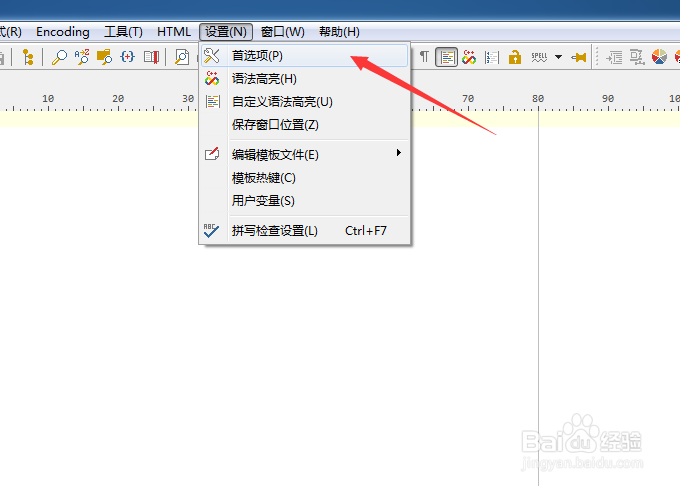
1、点击菜单中的设置菜单

PSPad editor怎么设置搜索结果为置中

2、弹出了下拉菜单选中为首选项

PSPad editor怎么设置搜索结果为置中

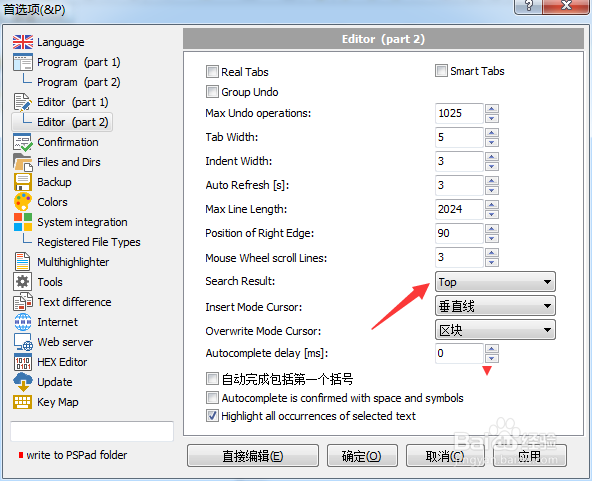
3、点击左侧中editor选项

PSPad editor怎么设置搜索结果为置中

4、点击search result选项

PSPad editor怎么设置搜索结果为置中

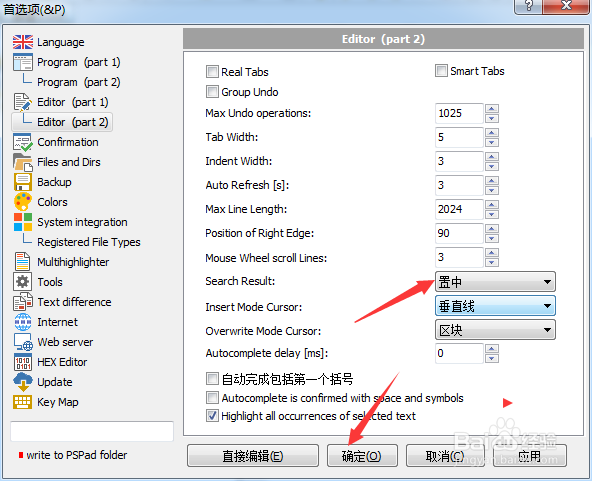
5、弹出了下拉菜单选择为置中

PSPad editor怎么设置搜索结果为置中

6、选择为置中之后,点击确定

PSPad editor怎么设置搜索结果为置中
  • PSPad editor怎么设置覆盖模式光标为水平线
  • PSPad editor怎么设置搜索结果为默认值
  • PSPad editor怎么设置自动完成延迟为1
  • PSPad editor怎么设置插入模式光标为区块
  • PSPad editor怎么设置循环浏览书签
  • 热门搜索
    现代领动怎么样 玛卡泡酒配方大全 恐龙游戏大全 鱼汤的做法大全 收获日2怎么联机 经营模式怎么写 四川方言电视剧大全 男士手表品牌大全 桌面壁纸图片大全 斗鱼怎么开直播间