PSPad editor怎么开启显示启动屏幕

 时间:2024-10-31 04:44:38

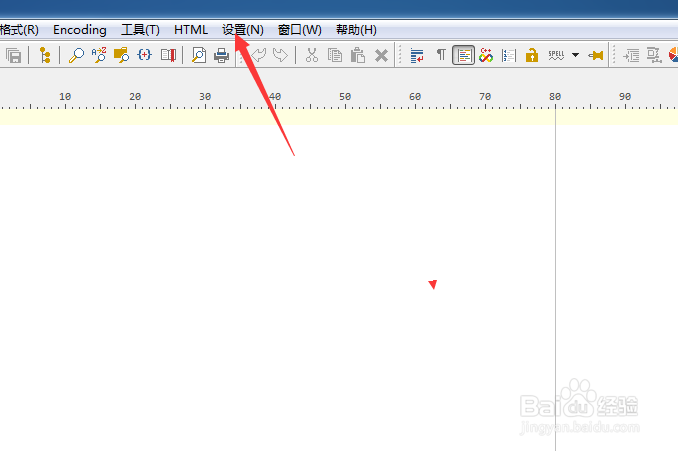
1、点击菜单中设置菜单

PSPad editor怎么开启显示启动屏幕

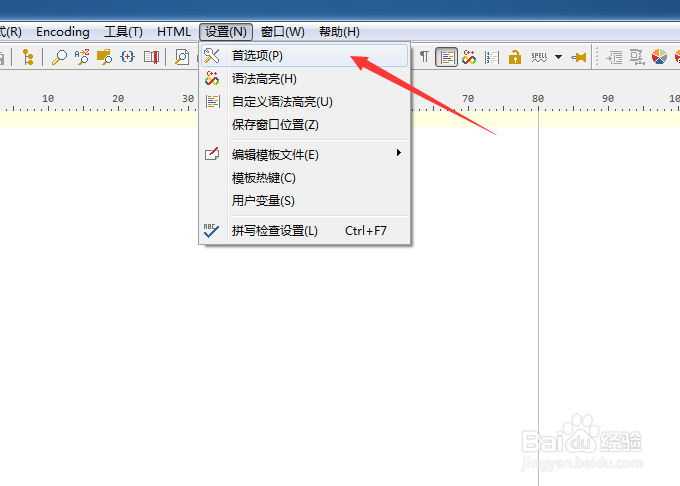
2、弹出了下拉菜单选择首选项

PSPad editor怎么开启显示启动屏幕

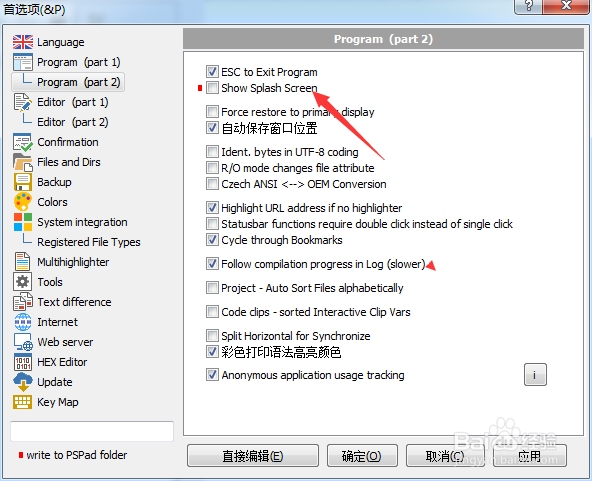
3、点击左侧中的program选项

PSPad editor怎么开启显示启动屏幕

4、勾选show splash screen选项

PSPad editor怎么开启显示启动屏幕

5、勾选show splash screen选项之后,点击确定

PSPad editor怎么开启显示启动屏幕
  • PSPad editor怎么工具栏图标集为pspad
  • PSPad editor怎么菜单图标集为PSpad
  • PSPad editor怎么关闭显示启动屏幕
  • PSPad editor怎么开启esc退出程序
  • PSPad editor怎么开启记住文件状态
  • 热门搜索
    seek是什么意思 pumpkin是什么意思 电脑用户名是什么 大学运动会新闻稿 make love是什么意思 什么牌子手机好 股票xd开头是什么意思 维生素b6的作用 什么是基础养老金 硬盘缓存有什么用