PSPad editor怎么关闭自动缩排模式

 时间:2026-04-23 12:36:49

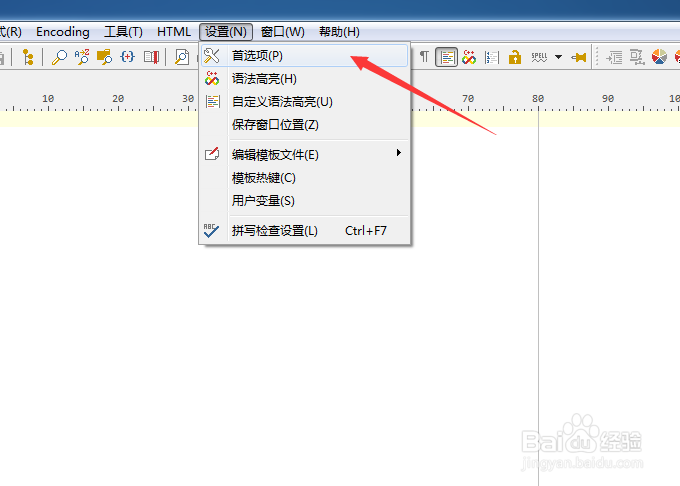
1、点击菜单中的设置菜单

PSPad editor怎么关闭自动缩排模式

2、弹出了下拉菜单选中为首选项

PSPad editor怎么关闭自动缩排模式

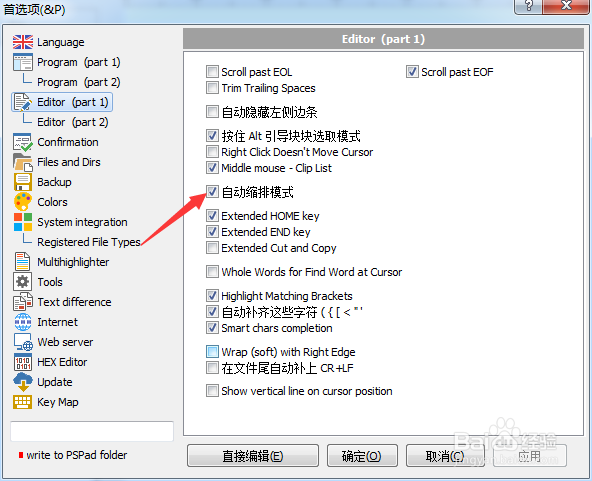
3、点击左侧中editor选项

PSPad editor怎么关闭自动缩排模式

4、去掉勾选上自动缩排模式选项

PSPad editor怎么关闭自动缩排模式

5、去掉勾选上自动缩排模式选项之后,点击确定

PSPad editor怎么关闭自动缩排模式

  • PSPad editor怎么关闭在菜单中显示图标
  • PSPad editor怎么对代码剪辑关闭
  • PSPad editor怎么关闭显示启动屏幕
  • PSPad editor怎么关闭ro模式更改文件属性
  • PSPad editor怎么关闭后台编译
  • 热门搜索
    简单的花怎么画 湖南理工学院怎么样 天津科技大学怎么样 谢谢韩语怎么说 四季沐歌太阳能怎么样 地暖怎么清洗 怎么把字写好看 怎么增高 孩子不吃饭怎么办 发烧39度怎么办