PSPad editor怎么关闭后台编译

 时间:2024-10-29 14:12:41

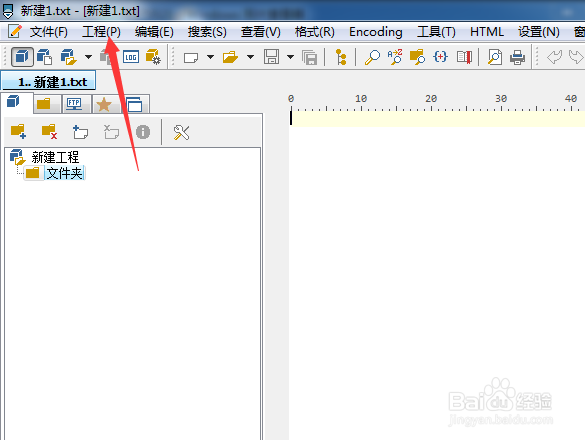
1、点击菜单中工程菜单

PSPad editor怎么关闭后台编译

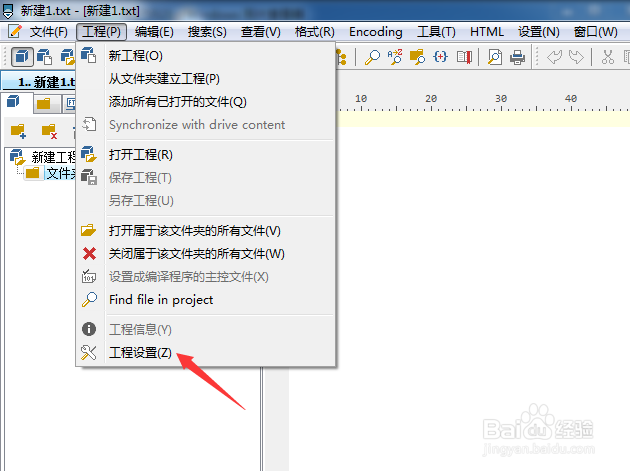
2、弹出了下拉选择为工程设置

PSPad editor怎么关闭后台编译

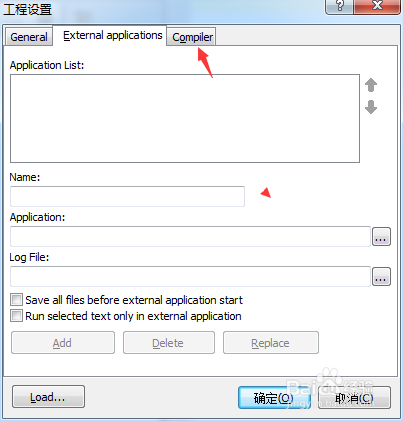
3、点击compiler选项

PSPad editor怎么关闭后台编译

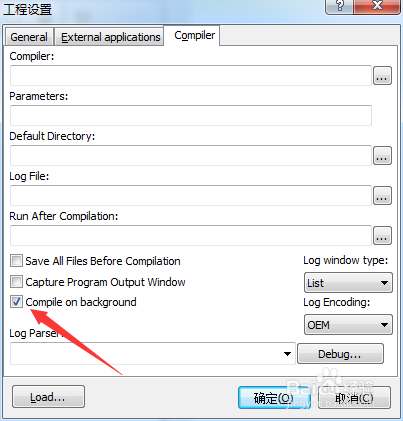
4、去掉勾选上compile on background选项

PSPad editor怎么关闭后台编译

5、去掉勾选上compile on background选项之后,点击确定
PSPad editor怎么关闭后台编译
  • PSPad editor怎么关闭显示启动屏幕
  • PSPad editor怎么关闭esc退出程序
  • PSPad editor怎么关闭在菜单中显示图标
  • PSPad editor怎么工具栏图标集为pspad
  • PSPad editor怎么设置标签宽度
  • 热门搜索
    建设银行怎么查开户行 工作经历怎么写 曹彰怎么死的 怎么把照片缩小 怎么给u盘设置密码 施工日志怎么写 测孕纸怎么用 桌面上的图标不见了怎么办 异地恋怎么办 怎么取网名