在FastStoneViewer处理RAW文件中如何自动白平衡

 时间:2024-10-12 09:17:46

1、点击“FastStoneImageViewer”

在FastStoneViewer处理RAW文件中如何自动白平衡

2、在“FastStoneImageViewer”窗口中,点击“设置”

在FastStoneViewer处理RAW文件中如何自动白平衡

3、在弹出下拉栏中,再次点击“设置”

在FastStoneViewer处理RAW文件中如何自动白平衡

4、在“设置”窗口中,点击“RAW文件”

在FastStoneViewer处理RAW文件中如何自动白平衡

5、在“RAW文件”窗口中,选中“自动白平衡”

在FastStoneViewer处理RAW文件中如何自动白平衡

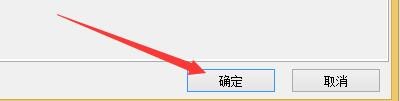
6、点击“确定”即可

在FastStoneViewer处理RAW文件中如何自动白平衡
  • 如何在FastStoneViewer程序中按Esc键停止播放
  • FastStoneViewer如何启用自动锁定缩放比例图像
  • 如何在FastStoneViewer程序中双击鼠标全屏播放
  • FastStoneViewer如何启用缩略图边框矩形形状
  • 如何设置FastStoneViewer更改放大镜放大比例
  • 热门搜索
    玉碎了怎么办 感冒喉咙痛怎么办 情怀的近义词 证实的近义词 按键精灵怎么设置循环 绿伞洗衣液怎么样 脸上螨虫怎么去除 阿喀琉斯之踵怎么读 90后发型 渐渐的近义词