如何在FastStoneViewer程序中按Esc键停止播放

 时间:2026-02-14 14:20:42

1、点击“FastStoneImageViewer”

如何在FastStoneViewer程序中按Esc键停止播放

2、在“FastStoneImageViewer”窗口中,点击“设置”

如何在FastStoneViewer程序中按Esc键停止播放

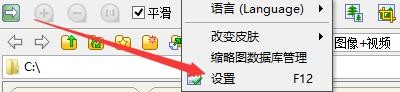
3、在弹出下拉栏中,再次点击“设置”

如何在FastStoneViewer程序中按Esc键停止播放

4、在“设置”窗口中,点击“视频文件”

如何在FastStoneViewer程序中按Esc键停止播放

5、在“视频文件”窗口中,勾选“按Esc键停止播放”

如何在FastStoneViewer程序中按Esc键停止播放

6、点击“确定”即可

如何在FastStoneViewer程序中按Esc键停止播放

  • FastStoneViewer如何在全屏模式不显示鼠标沙漏
  • FastStoneViewer如何启用详细信息浏览模式
  • 如何设置FastStoneViewer更改放大镜放大比例
  • FastStoneViewer读取图像如何重置位置到(0,0)
  • FastStoneViewer如何启用自动锁定缩放比例图像
  • 热门搜索
    什么人不能吃枸杞 祈使句是什么意思 什么是成语 耳朵响是什么原因 什么路最窄 伤残鉴定什么时候做 疫情是什么意思 鸡内金是什么 住宿费计入什么科目 风和日丽是什么意思