WebStorm 2021.1.2怎么设置显示文件扩展名

 时间:2026-04-24 04:20:29

1、打开一个WebStorm的界面中

WebStorm 2021.1.2怎么设置显示文件扩展名

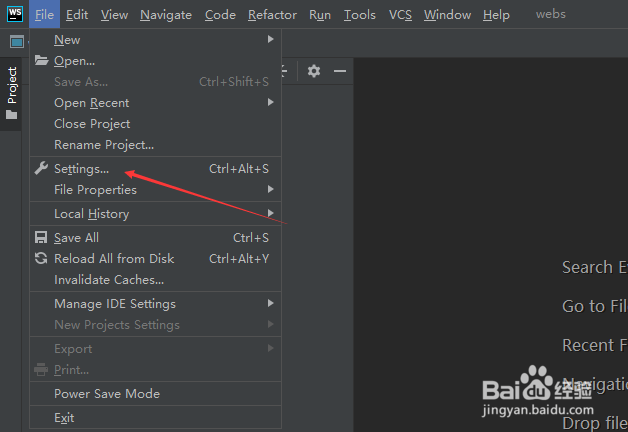
2、点击左上角中file菜单

WebStorm 2021.1.2怎么设置显示文件扩展名

3、弹出了下拉菜单选中settings选项

WebStorm 2021.1.2怎么设置显示文件扩展名

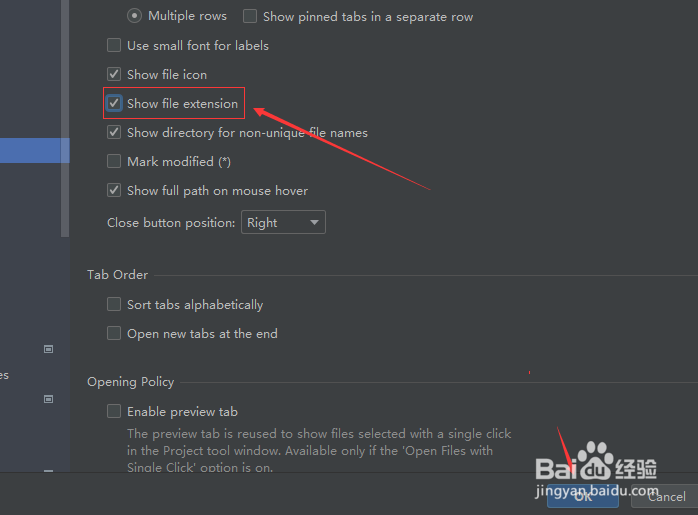
4、点击左侧中的editor tabs选项

WebStorm 2021.1.2怎么设置显示文件扩展名

5、勾选show file extension选项

WebStorm 2021.1.2怎么设置显示文件扩展名

6、勾选show file extension选项之后,点击ok

WebStorm 2021.1.2怎么设置显示文件扩展名

  • WebStorm 2021.1.2怎么设置所有字母
  • WebStorm 2021.1.2怎么关闭显示文件扩展名
  • WebStorm 2021.1.2怎么设置xml文本
  • WebStorm 2021.1.2怎么设置显示面包屑
  • WebStorm 2021.1.2怎么设置方法体
  • 热门搜索
    100种花的折法大全图解 游戏战队名字大全 ipad闪退怎么修复 长平之战简介 违章罚款怎么交 四字祝福语大全 爱奇艺怎么下载电影 芝麻分怎么查 后宫动漫大全 三年级作文大全