PSPad editor怎么设置代码剪辑

 时间:2026-04-23 03:44:58

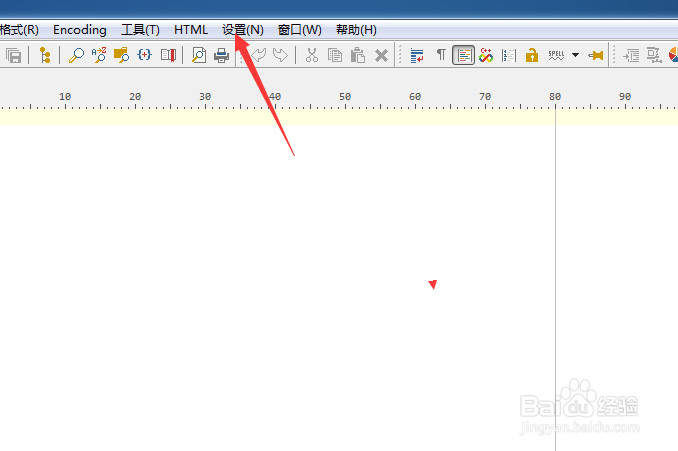
1、点击菜单中的设置菜单

PSPad editor怎么设置代码剪辑

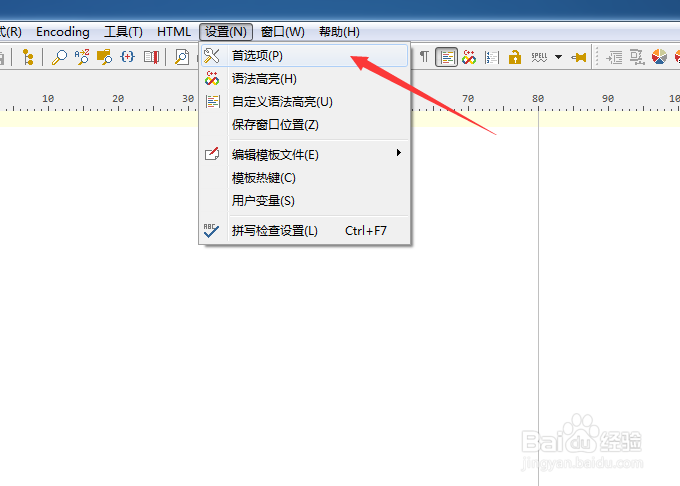
2、弹出了下拉菜单选中为首选项

PSPad editor怎么设置代码剪辑

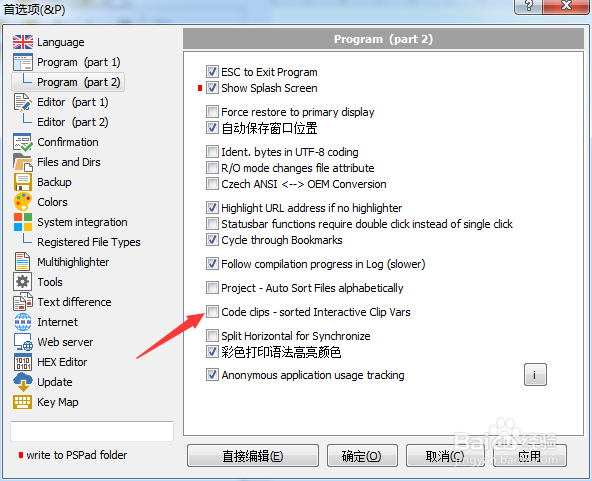
3、点击左侧中program选项

PSPad editor怎么设置代码剪辑

4、勾选上code clips选项

PSPad editor怎么设置代码剪辑

5、勾选上code clips选项之后,点击确定

PSPad editor怎么设置代码剪辑

  • PSPad editor怎么设置搜索结果为置中
  • PSPad editor怎么关闭pspad前显示确认对话框
  • PSPad editor怎么设置集成脚本支持
  • PSPad editor怎么对代码剪辑关闭
  • PSPad editor怎么设置标签宽度
  • 热门搜索
    曹云金和郭德纲怎么了 怎么打开注册表 怎么调整照片大小 产妇便秘怎么办 脚汗多脚臭怎么办 怎么做红烧鱼 打六折怎么算 肺纤维化怎么治疗 电脑怎么共享打印机 怎么剪辑歌曲