1、点击“FastStoneImageViewer”

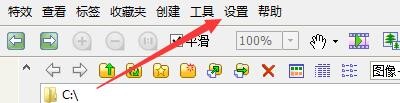
2、在“FastStoneImageViewer”窗口中,点击“设置”
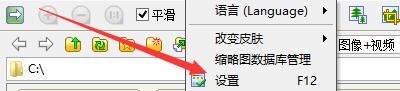
3、在弹出下拉栏中,再次点击“设置”
4、在“设置”窗口中,点击“查看”

5、在“查看”窗口中,点击“触摸屏换页”按钮,在弹出栏目框中,点击“渐变效果”

6、点击“确定”即可

时间:2026-04-25 07:34:20
1、点击“FastStoneImageViewer”
2、在“FastStoneImageViewer”窗口中,点击“设置”
3、在弹出下拉栏中,再次点击“设置”
4、在“设置”窗口中,点击“查看”
5、在“查看”窗口中,点击“触摸屏换页”按钮,在弹出栏目框中,点击“渐变效果”
6、点击“确定”即可
