apple mobile device support无法卸载、更新

 时间:2026-02-17 22:35:39

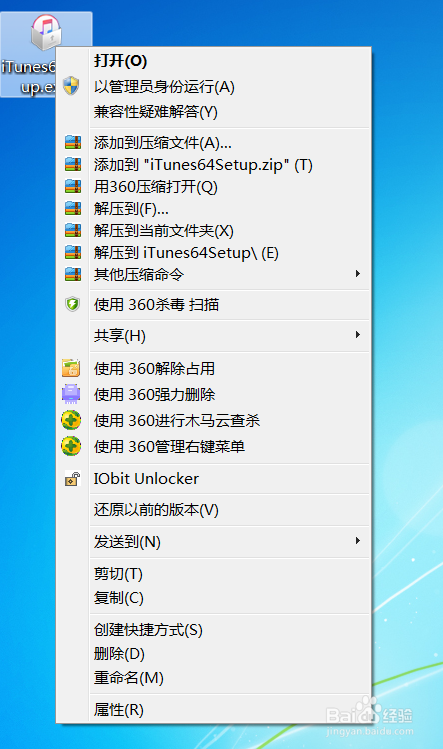
1、在官网下载最新版本的itunes安装程序,在exe文件上右键,选择用360压缩打开,把里面的applemobiledevicesupport.msi解压出来。
apple mobile device support无法卸载、更新

apple mobile device support无法卸载、更新

2、然后在控制面板—程序—程序和功能: apple mobile device support,右键选择修复,修复文件选择之前解压出的applemobiledevicesupport.msi文件,修复后卸载applemobiledevicesupport。

apple mobile device support无法卸载、更新

3、如果卸载失败,再修复几次,或者在更改里 重复几次Repair 和 Remove,修复几次以后,卸载掉applemobiledevicesupport,然后在用之前解压出的applemobiledevicesupport.msi重新装一下,解决。

apple mobile device support无法卸载、更新

  • excle中怎么拆分固定电话的区号和数字
  • Windows server 2008 R2如何删除DNS服务器
  • plsql13 怎么设置中文
  • svn红色感叹号如何解决
  • java获取当前年份
  • 热门搜索
    年终总结怎么写 酒后头痛怎么办 坚固的近义词 误解的近义词 一直干咳怎么办 税负怎么算 电视剧怎么下载 今天运气怎么这么好 炎热的近义词 鼻塞流鼻涕怎么办