win11怎么启动Credential Manager服务

 时间:2026-04-23 21:28:27

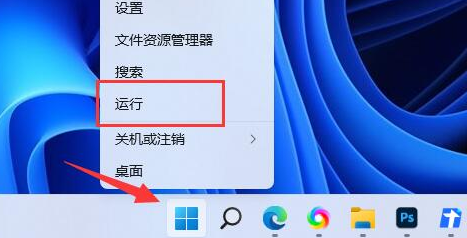
1、右键开始菜单,打开“运行”

win11怎么启动Credential Manager服务

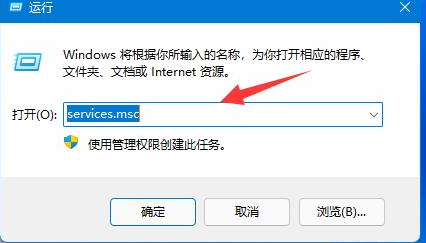
2、在其中输入“services.msc”回车打开服务列表。

win11怎么启动Credential Manager服务

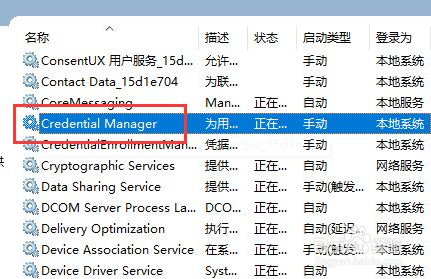
3、在服务中找到并双击打开“Credential Manager”

win11怎么启动Credential Manager服务

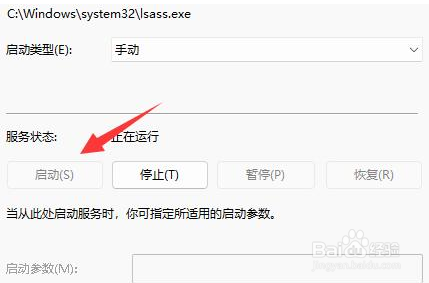
4、最后点击其中的“启动”就可以。

win11怎么启动Credential Manager服务

  • 解决WMIC中普通用户远程管理时拒绝访问错误
  • WIN10系统蓝屏,错误代码kernel security check failure
  • win7设置启动默认引导的方法
  • 教你通过修改注册表来加快电脑自动刷新率
  • 怎么样去掉win11系统的显示更多选项方法
  • 热门搜索
    怯怎么读 为什么你背着我爱别人 堤怎么读 希芸护肤品怎么样 马齿苋怎么吃 虾仁馄饨的做法 会稽怎么读 身份证怎么挂失 尚品宅配怎么样 小鸟站在高压线上为什么不会触电