1、先把windows xp mode关机掉,(如果已关掉的可以略过)

2、再选择开始——所有程序。

3、然后找到Windows Virtual PC,点击打开再一次点击Windows Virtual PC。

4、接着是新窗口鼠标放在虚拟机上面右键选择设置。

5、然后选择页面左侧最下面关闭,点击一下。
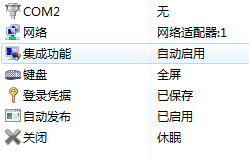
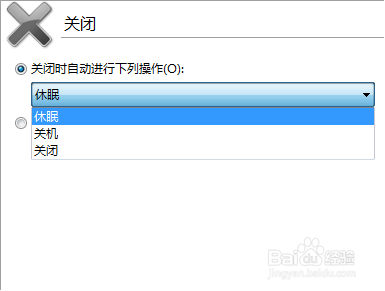
6、最后,在右边点击弹开向下箭头下拉框,选择关机——在确定即可。
时间:2026-05-07 06:14:06
1、先把windows xp mode关机掉,(如果已关掉的可以略过)
2、再选择开始——所有程序。
3、然后找到Windows Virtual PC,点击打开再一次点击Windows Virtual PC。
4、接着是新窗口鼠标放在虚拟机上面右键选择设置。
5、然后选择页面左侧最下面关闭,点击一下。
6、最后,在右边点击弹开向下箭头下拉框,选择关机——在确定即可。
