Samsung Galaxy S7 edge SM-G9350如何开启振动反馈功能?

 时间:2026-02-15 06:40:01

振动反馈功能是设备在点击返回键或最近键和执行其他操作 (例如点住项目) 时产生振动。若想开启此功能,请按照以下步骤进行操作:

步骤

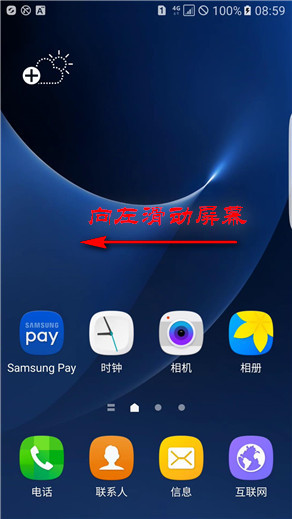
1.在待机页面下,向左滑动主屏幕页面。
Samsung Galaxy S7 edge SM-G9350如何开启振动反馈功能?

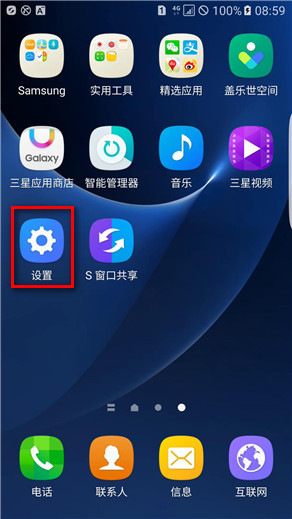
2.点击【设置】。

Samsung Galaxy S7 edge SM-G9350如何开启振动反馈功能?

3.点击【声音和振动】。

Samsung Galaxy S7 edge SM-G9350如何开启振动反馈功能?

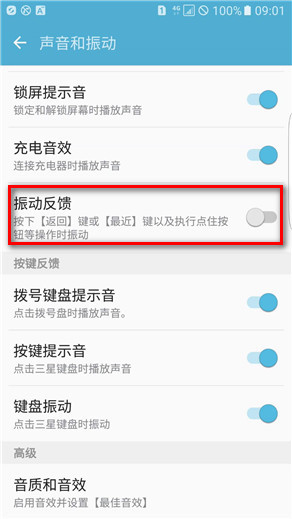
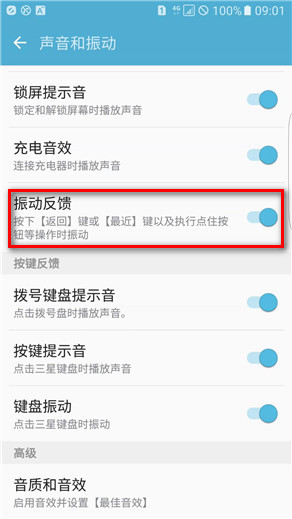
4.向上滑动屏幕,点亮【振动反馈】右侧的滑块开关即可。

Samsung Galaxy S7 edge SM-G9350如何开启振动反馈功能?

Samsung Galaxy S7 edge SM-G9350如何开启振动反馈功能?

  • Samsung Galaxy S7 edge SM-G9350如何开启轻松静音功能?
  • Samsung Galaxy S7 edge SM-G9350如何开启体感拨号功能?
  • Samsung Galaxy S7 edge SM-G9350如何开启私密模式?
  • Samsung Galaxy S7 edge SM-G9350如何开启智能休眠功能?
  • Samsung Galaxy S7 edge SM-G9350如何开启使用指纹验证三星帐户?
  • 热门搜索
    心情图片大全 官场小说大全 平书大全 检讨书大全 女孩英文名字大全 怎么治疗寻麻疹 手工折纸大全 怎么成为心悦会员 电影八佰简介 猫的图片大全