chrome浏览器右键搜索时提示无法访问怎么办

 时间:2024-10-24 00:57:16

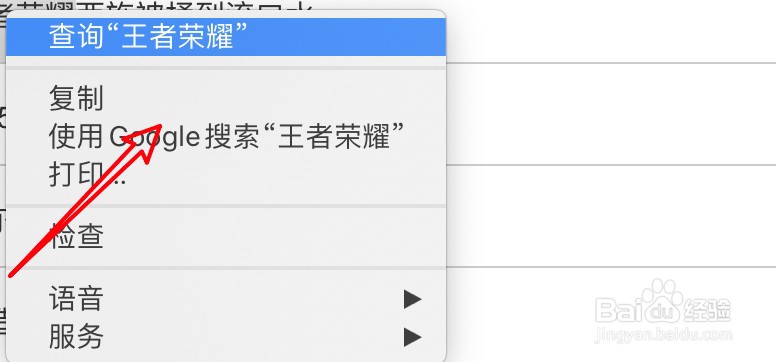
1、选中要搜索的文件,右键点击搜索。

chrome浏览器右键搜索时提示无法访问怎么办

2、提示无法访问。

chrome浏览器右键搜索时提示无法访问怎么办

3、要解决问题,点击右上角的小圆点。

chrome浏览器右键搜索时提示无法访问怎么办

4、点击设置。

chrome浏览器右键搜索时提示无法访问怎么办

5、点击搜索引擎。

chrome浏览器右键搜索时提示无法访问怎么办

6、点击下拉框。

chrome浏览器右键搜索时提示无法访问怎么办

7、选择百度即可,默认的搜索引擎网站连接是有问题的。

chrome浏览器右键搜索时提示无法访问怎么办
  • win2003怎么卸载程序
  • Chrome浏览器保存组功能设置方法介绍
  • 解决移动硬盘无法访问I:\。执行页内操作时错误
  • PowerDesigner打印错误怎么解决?
  • 区块链的分类
  • 热门搜索
    支原体衣原体感染是怎么回事 咬牙是怎么回事 怎么蒸螃蟹 怎么知道怀孕了 蒜头鼻怎么办 qq怎么改名字 丰田怎么样 密码忘记了怎么办 自拍杆怎么连接手机 brush怎么读