1、点击打开电脑上的Microsoft Office PowerPoint 2003软件。

2、输入你要编辑的文字。

3、选中你要编辑的文字部分。

4、点击菜单中的格式。

5、点击弹出菜单中的字体。

6、根据你的喜好设置好字体。

7、设置好字形、字号和颜色。

8、其他的效果部分根据自己的需要来设置。
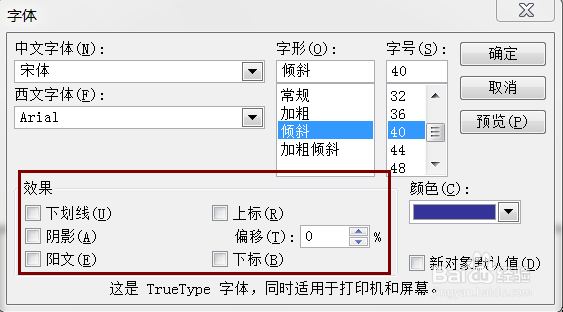
9、这样字体格式就设置好了。

时间:2026-05-10 03:01:04
1、点击打开电脑上的Microsoft Office PowerPoint 2003软件。
2、输入你要编辑的文字。
3、选中你要编辑的文字部分。
4、点击菜单中的格式。
5、点击弹出菜单中的字体。
6、根据你的喜好设置好字体。
7、设置好字形、字号和颜色。
8、其他的效果部分根据自己的需要来设置。
9、这样字体格式就设置好了。
