SmartSystemMenu自定义窗口大小如何设置

 时间:2026-02-21 18:15:24

1、鼠标右击SmartSystemMenu图标按钮,在弹出菜单中的选择“设置”按钮。

SmartSystemMenu自定义窗口大小如何设置

2、鼠标点击菜单选项按钮。

SmartSystemMenu自定义窗口大小如何设置

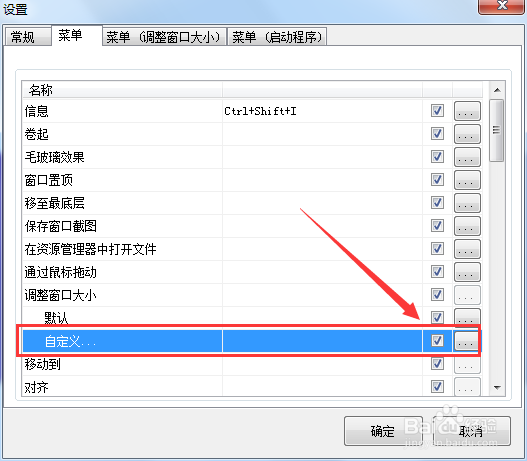
3、勾选方框中的选项即可开启SmartSystemMenu自定义窗口大小。

SmartSystemMenu自定义窗口大小如何设置

  • SmartSystemMenu如何添加新的进程
  • SmartSystemMenu窗口中怎么加入通过鼠标拖动
  • SmartSystemMenu怎么卷起窗口
  • SmartSystemMenu窗口置顶怎么开启
  • SmartSystemMenu中的进程怎么删除
  • 热门搜索
    六合资料大全 可莱丝面膜怎么样 bt搜索引擎大全 比亚迪s7怎么样 陈若仪个人资料简介 假声怎么唱 服装店名大全 怎么调节屏幕亮度 怎么发帖 三国演义简介