corel motionstudio 3D安装后再打开出错解决

 时间:2024-10-21 10:11:40

1、关闭错误窗口

corel motionstudio 3D安装后再打开出错解决

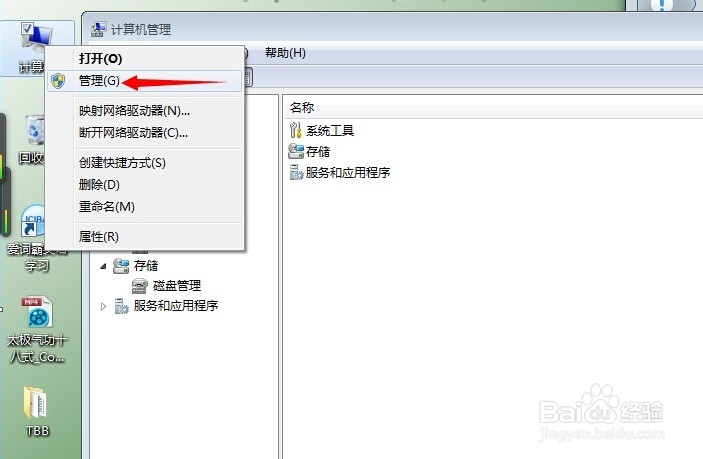
2、鼠标右键,点击【管理】

corel motionstudio 3D安装后再打开出错解决

3、出现对话框后,点【服务和应用程序】

corel motionstudio 3D安装后再打开出错解决

4、再双击【服务】,出现列表

corel motionstudio 3D安装后再打开出错解决

5、直接【键盘p】,弹出如下所示

corel motionstudio 3D安装后再打开出错解决

6、找到protexis licensing v2选项点击【启动】

corel motionstudio 3D安装后再打开出错解决

7、服务启动后,关闭对话框

corel motionstudio 3D安装后再打开出错解决

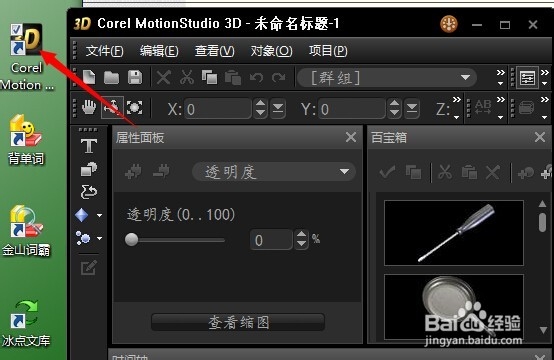
8、再次双击桌面快捷键,程序即可正常运行

corel motionstudio 3D安装后再打开出错解决
  • [Motion Studio教程1] 如何安裝開發環境
  • 再EPLAN里面添加铁体接近动作开关
  • ANSYS 16.0打开时显示证书错误怎么办
  • wincc flexible如何给圆对象连接变量
  • 如何使用串口工具观测串口输出数据
  • 热门搜索
    下标怎么打 云中君怎么玩 武汉大学怎么样 薛佳凝和胡歌怎么回事 ps怎么撤销上一步 ps魔棒工具怎么抠图 珑骧怎么读 球球大作战怎么玩 荷包蛋怎么煮 综合评价怎么写