如何设置Flashnote新建子便条

 时间:2024-10-30 08:09:30

1、点击“Flashnote”

如何设置Flashnote新建子便条

2、在“Flashnote”窗口中,点击“便条”

如何设置Flashnote新建子便条

3、在弹出下拉栏中,点击“新建子便条”

如何设置Flashnote新建子便条

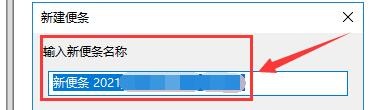
4、在弹出窗口中,需输入新建子便条的名称

如何设置Flashnote新建子便条

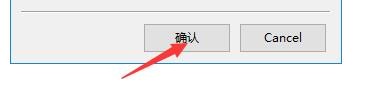
5、点击“确认”即可

如何设置Flashnote新建子便条
  • Illustrator怎么新建子图层
  • 如何设置Flashnote每30天检查一次更新
  • 如何设置Flashnote退出确认提示
  • 如何设置Flashnote在系统托盘显示图标
  • AI如何新建子图层
  • 热门搜索
    带鱼怎么炸好吃 葡萄干怎么吃 预计净残值怎么算 肚子痛是怎么回事 教育类别怎么填 脸上起皮怎么办 委托书的格式怎么写 怎么治疗脱发 怎么练好字 干贝怎么吃