如何设置GOMPlayer启动自动检查最新版功能

 时间:2024-10-12 06:56:11

1、点击“GOMPlayer”

如何设置GOMPlayer启动自动检查最新版功能

2、在“GOMPlayer”窗口中,点击“设置”

如何设置GOMPlayer启动自动检查最新版功能

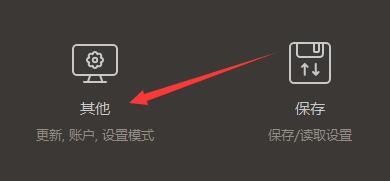
3、在“设置”窗口中,点击“其他”

如何设置GOMPlayer启动自动检查最新版功能

4、在“其他”窗口中,点击“更新”

如何设置GOMPlayer启动自动检查最新版功能

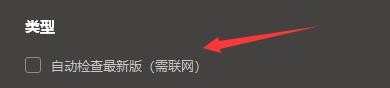
5、在“更新”窗口中,勾选“自动检查最新版(需联网)”

如何设置GOMPlayer启动自动检查最新版功能

6、点击“关闭”窗口即可

如何设置GOMPlayer启动自动检查最新版功能
  • 如何设置GOMPlayer启用视频满屏播放
  • 如何设置GOMPlayer使用字幕功能
  • 如何设置GOMPlayer启用接受字幕推荐功能
  • 如何设置GOMPlayer使用音频文件的专辑封面图片
  • 如何设置GOMPlayer启用PIP播放功能
  • 热门搜索
    双胞胎集团怎么样 性生活片 武汉得意生活 如何开书店 中二是什么意思 新生儿如何补钙 会声会影如何剪辑视频 wool是什么面料 30岁的女人如何保养 三国志13怎么娶貂蝉