在endnote中添加Chinese Standard GBT7714格式

 时间:2026-04-29 03:31:05

1、打开word文档,找到顶部endnote栏,下拉style菜单后,找到Chinese Standard GBT7714,若未找到,可通过以下两种方式解决:

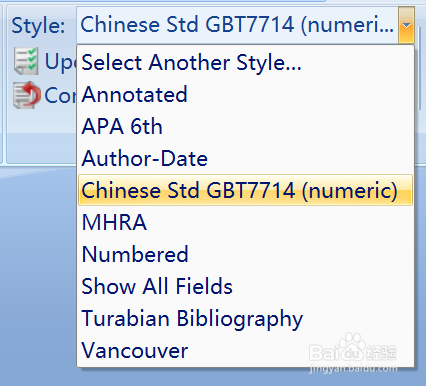
在endnote中添加Chinese Standard GBT7714格式

在endnote中添加Chinese Standard GBT7714格式

2、解决方法一:打开“select another style”寻找。

若仍未找到,则未安装该格式,可通过第二个方法解决。

在endnote中添加Chinese Standard GBT7714格式

3、解决方法二:在endnote官网下载Chinese Standard GBT7714(numeric)。打开endnote安装目录,找到style文件夹。将下载好的文件移入style文件夹。

附网址:https://www.endnote.com/style_download/chinese-standard-gb-t7714-numeric/

在endnote中添加Chinese Standard GBT7714格式

在endnote中添加Chinese Standard GBT7714格式

在endnote中添加Chinese Standard GBT7714格式

4、回到word文档即可在style菜单中找到“Chinese Standard GBT7714(numeric)”,选中后自动更新参考文献格式,也可以通过点击“update citations and bibliography”进行更新。

在endnote中添加Chinese Standard GBT7714格式

在endnote中添加Chinese Standard GBT7714格式

5、其他文献格式同上操作即可。

  • endnote怎么导入文献
  • 怎么用endnote软件把参考文献插入到word里面
  • endnote插入文献时出现{,#}这样的乱码,怎么解
  • 如何删除EndNote插入的文献
  • endnote怎么修改参考文献格式
  • 热门搜索
    莫比乌斯带怎么做 圆规怎么用 火车票怎么退票 怎么样提高精子质量 高原红怎么去除 怎么办签证 怎么样能丰胸 喜帖怎么写 岔气是怎么回事 网上怎么挣钱