Powerpoint中三维柱形图背面墙颜色如何设置?

 时间:2026-02-14 12:16:57

1、在Powerpoint中插入三维柱形图。

Powerpoint中三维柱形图背面墙颜色如何设置?

2、选中柱形图。

Powerpoint中三维柱形图背面墙颜色如何设置?

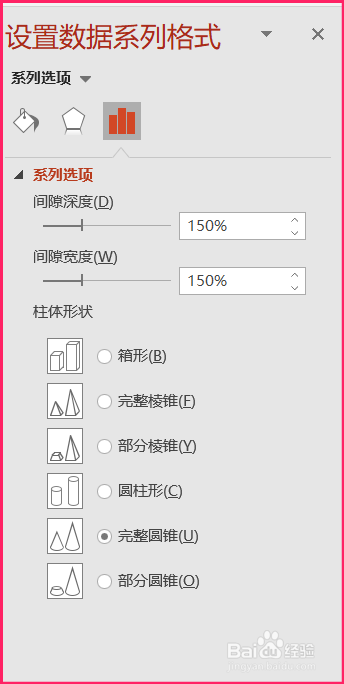
3、弹出设置数据系列格式菜单。

Powerpoint中三维柱形图背面墙颜色如何设置?

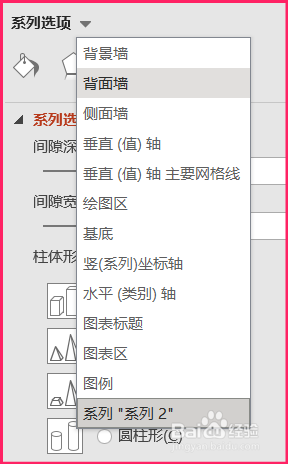
4、点击系列选项附近的下拉三角,在弹出的下拉菜单中选择背面墙。

Powerpoint中三维柱形图背面墙颜色如何设置?

5、在背面墙菜单中点击填充,选择纯色填充。

Powerpoint中三维柱形图背面墙颜色如何设置?

6、设置颜色选项。

Powerpoint中三维柱形图背面墙颜色如何设置?

7、三维柱形图背面墙的颜色就设置好了。

Powerpoint中三维柱形图背面墙颜色如何设置?

  • 三维柱形图如何修改为绿色背景
  • PPT2010怎样修改幻灯片的起始编号
  • PowerPoint2013中SmartArt详细介绍
  • 办公软件,幻灯片怎么设置隐藏幻灯片呢?
  • Excel2010中降序排序的操作方法
  • 热门搜索
    苛刻是什么意思 女儿红是什么酒 禾尤山念什么 猫薄荷对猫有什么作用 巴图为什么叫巴图 红枣和枸杞一起泡水喝有什么作用 amigo是什么意思 hkd是什么意思 成都有什么好玩的地方 良人是什么意思