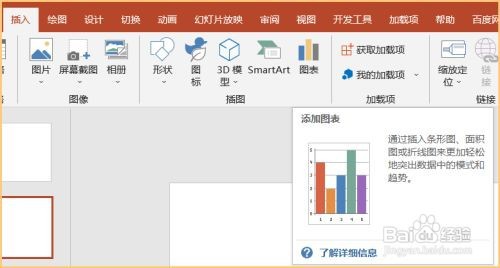
1、第一步:打开Powerpoint文稿,点击插入,选择图表。如图所示
2、第二步;然后在图表对话框中选择饼图,在右侧饼图样式中选择第三个子母饼图,如图所示

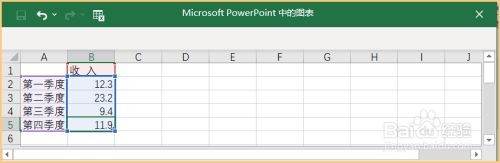
3、第三步:然后在弹出的excel对话框中输入数据。如图所示
4、第四步:最后子母饼图就插入Powerpoint页面,效果如图所示

时间:2026-04-23 00:19:39
1、第一步:打开Powerpoint文稿,点击插入,选择图表。如图所示
2、第二步;然后在图表对话框中选择饼图,在右侧饼图样式中选择第三个子母饼图,如图所示
3、第三步:然后在弹出的excel对话框中输入数据。如图所示
4、第四步:最后子母饼图就插入Powerpoint页面,效果如图所示
