Win10操作系统启动Device Install Service服务

 时间:2026-04-22 19:28:53

1、点击WIN10任务栏"开始"按钮

Win10操作系统启动Device Install Service服务

2、点击开始菜单"运行"磁贴

Win10操作系统启动Device Install Service服务

3、打开文本框输入"services.msc"命令

Win10操作系统启动Device Install Service服务

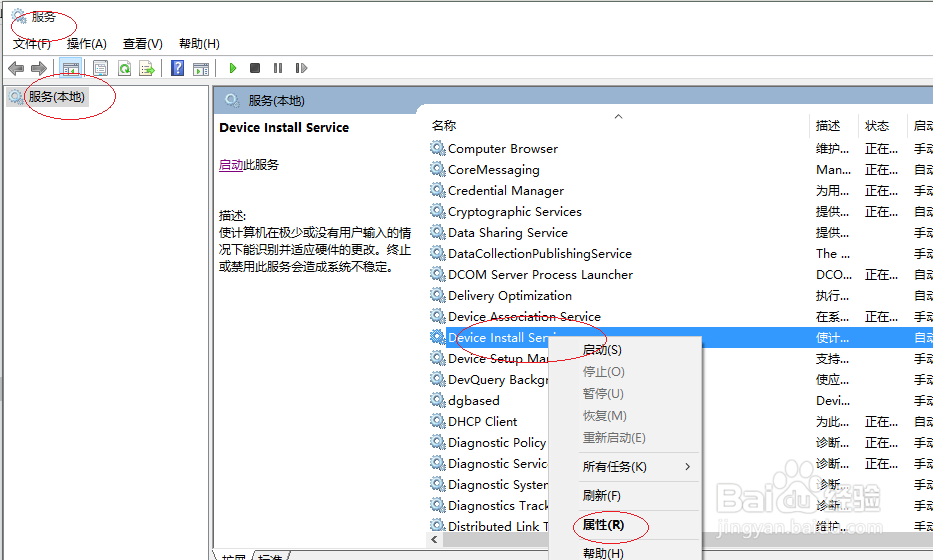
4、鼠标右击"Device Install Service"图标

Win10操作系统启动Device Install Service服务

5、选择"属性"项

Win10操作系统启动Device Install Service服务

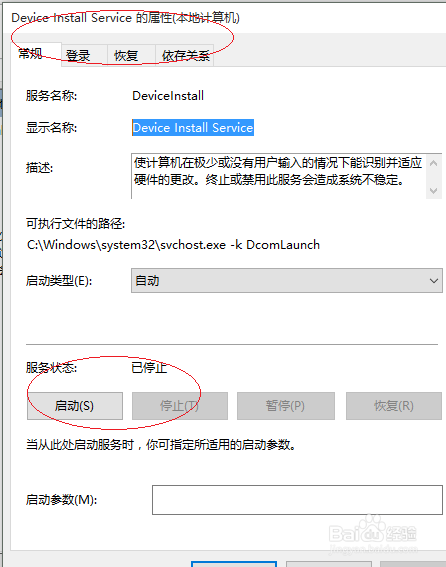
6、点击"服务状态|启动"按钮

Win10操作系统启动Device Install Service服务

7、本例到此结束,希望对大家能有所帮助

Win10操作系统启动Device Install Service服务

  • 无线网卡“该设备无法启动”(代码10)如何解决
  • 如何清理,net framework
  • Windows 系统将命令提示符以管理员权限打开
  • 笔记本系统重装后没有无线网卡驱动怎么办
  • 如何禁用和删除Windows RE
  • 热门搜索
    太原科技大学怎么样 血粘度高怎么办 cad怎么倒角 胜利的近义词 紧急避孕药吃多了会怎么样 中国国家博物馆 美丽的近义词是什么 扬州博物馆 倩碧三部曲怎么用 舒服的近义词