叮咚买菜如何关闭赠品提醒

 时间:2026-04-22 16:01:04

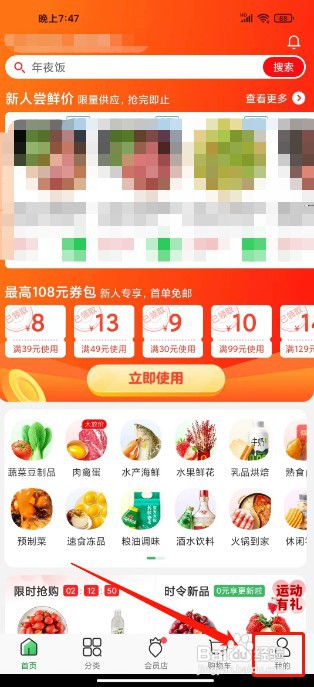
1、打开叮咚买菜app后,点击【我的】。

叮咚买菜如何关闭赠品提醒

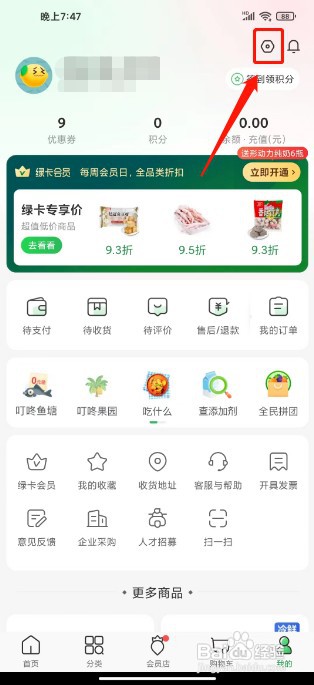
2、进入我的,点击【设置图标】。

叮咚买菜如何关闭赠品提醒

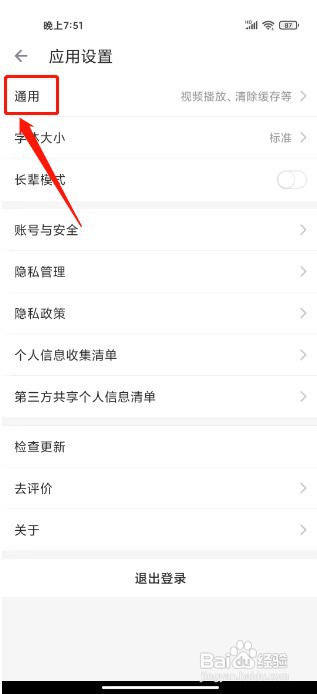
3、进入应用设置,点击【通用】。

叮咚买菜如何关闭赠品提醒

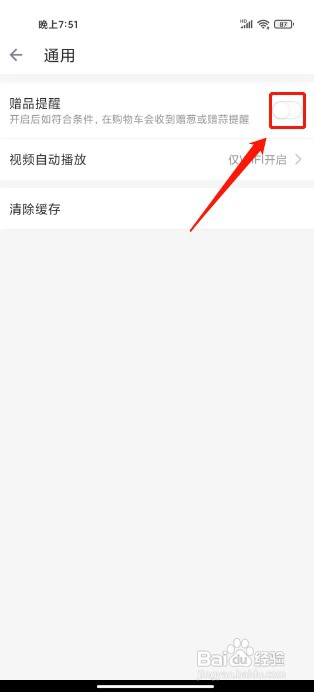
4、进入通用,点击【赠品提醒】右侧按钮关闭。

叮咚买菜如何关闭赠品提醒

  • 叮咚买菜怎么关闭赠品提醒
  • 叮咚买菜如何关闭赠品提醒
  • 叮咚买菜赠品提醒怎么关闭
  • 叮咚买菜如何关闭赠品提醒
  • 叮咚买菜如何开启赠品提醒
  • 热门搜索
    怎么除疤 吕梁旅游 海口旅游景点 山东旅游景点推荐 哥特式建筑的特点 四川有哪些旅游景点 产后多长时间可以同房 家里有小飞虫怎么办 睡觉不好怎么办 恩施大峡谷景区