苹果如何关闭game center

 时间:2026-04-24 04:39:52

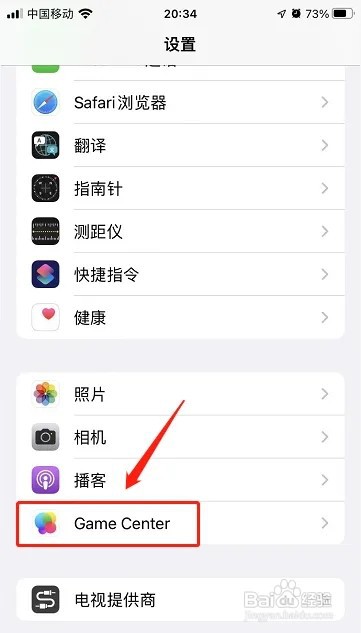
1、点击game center

进入苹果iphone手机设置界面后,点击【game center】。

苹果如何关闭game center

2、点击按钮关闭

进入game center界面,点击【game center】右侧按钮进行关闭。
苹果如何关闭game center

  • 苹果桌面没了Game Center怎么办
  • 苹果手机game center怎么解除与游戏的绑定
  • GameCenter无法连接服务器怎么办
  • 苹果手机如何退出登录Game center
  • 苹果iphone怎么关闭game center
  • 热门搜索
    密码忘记了怎么办 乳胶漆墙面脏了怎么办 易胖体质怎么减肥 鸡腿饭怎么做 高夫怎么样 怎么去痘坑 大众cc怎么样 捷豹怎么样 怎么减肥效果好 男人怎么减肥