1、下載Putty
2、Putty選用Telnet遠端連線,輸入IP與PORT並點選下方OPEN按鈕
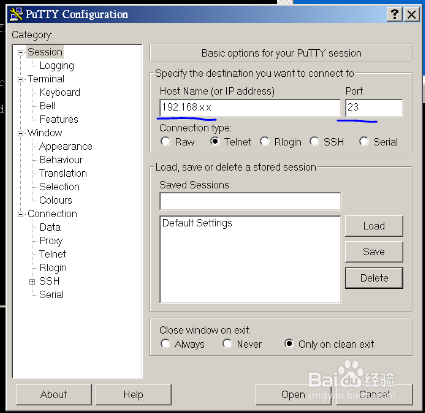
3、輸入帳號=>ENTER=>接著輸入密碼=>ENTER,成功進入後會出現#
4、輸入並按下ENTER=>
chmod 0600 /etc/ssh/ssh_host_rsa_key
5、輸入並按下ENTER=>
chmod 0600 /etc/ssh/ssh_host_dsa_key
6、輸入並按下ENTER=>
chmod 0600 /etc/config/ssh/ssh_host_rsa_key
7、輸入並按下ENTER=>
chmod 0600 /etc/config/ssh/ssh_host_dsa_key
8、輸入並按下ENTER=>
chmod 0644 /etc/ssh/*.pub
9、輸入並按下ENTER=>
chmod 0644 /etc/config/ssh/*.pub
10、接著重開Putty選用SSH遠端連線,輸入IP與PORT並點選下方OPEN按鈕以連線
