1、修改三台机上的/etc/hosts文件,使集群之前通过主机名可通信

2、编辑zookeeper配置文件,在后面添加集群信息(三台都要修改)
vi /usr/share/kafka/config/zookeeper.properties
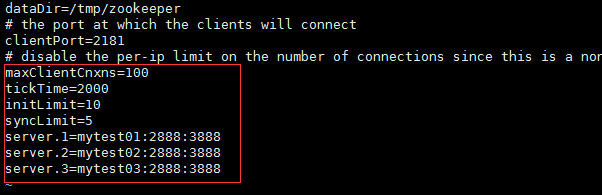
3、在/tmp下创建zookeeper目录,并执行如下命令
mytest01上:echo 1 >/tmp/zookeeper/myid
mytest02上:echo 2 >/tmp/zookeeper/myid
mytest03上:echo 3 >/tmp/zookeeper/myid

4、启动zookeeper
nohup /usr/share/kafka/bin/zookeeper-server-start.sh /usr/share/kafka/config/zookeeper.properties 2>1 &

5、修改kafka配置文件
vi /usr/share/kafka/config/server.properties
其中broker.id三台要不一样,依次设置为0、1、2


6、启动kafka
nohup /usr/share/kafka/bin/kafka-server-start.sh /usr/share/kafka/config/server.properties 2>1&
查看端口

