Windows 7 操作系统重建索引设置

 时间:2026-02-12 16:46:42

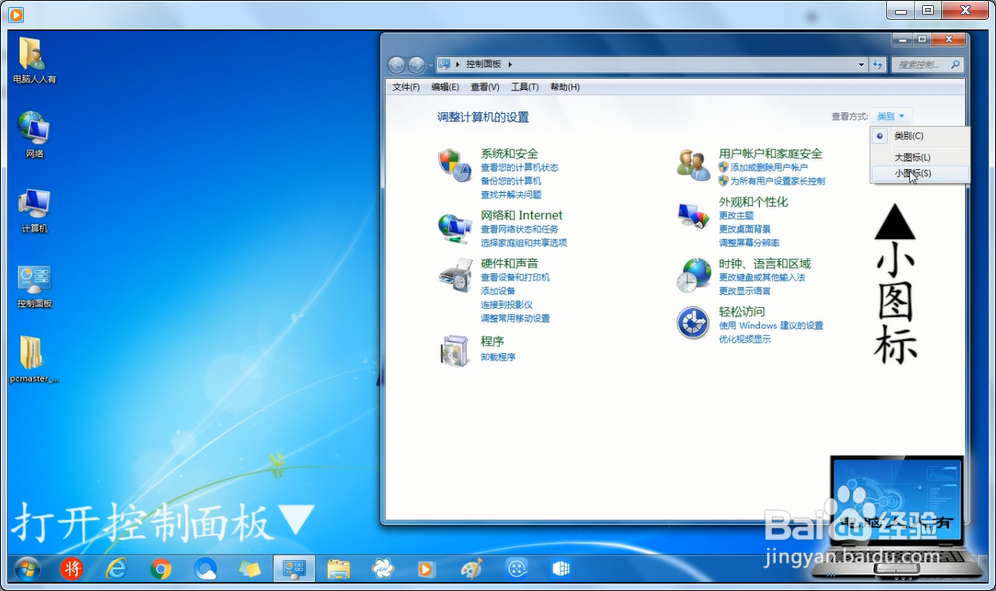
1、打开控制面板。

Windows 7 操作系统重建索引设置

2、查看方式:小图标。

Windows 7 操作系统重建索引设置

3、索引选项。

Windows 7 操作系统重建索引设置

4、高级。

Windows 7 操作系统重建索引设置

5、索引设置→重建。

Windows 7 操作系统重建索引设置

6、提示→确定。

Windows 7 操作系统重建索引设置

7、时间很长,但是,以后搜索起来会快一些。

Windows 7 操作系统重建索引设置

  • win7修改登录(欢迎)界面背景
  • 智卓高拍仪安装使用方法以及注意事项
  • 巧妙设置,让IE浏览器打开新连接窗口最大化
  • 电脑如何设置定时关机计划
  • office启动卡一会或者未响应的终极解决办法
  • 热门搜索
    105000大写怎么写 我的世界楼梯怎么做 oppor9s怎么分屏 身上痒一挠就起疙瘩是怎么回事 厕所堵了怎么疏通 脸上长色斑怎么办 医保卡怎么挂失 眼睛肿怎么办 快三怎么玩 文件打不开怎么办