1、安装好cool edit pro后,打开该软件,进入其主界面;

2、点击文件,选择打开命令;

3、找到需要去噪处理的音乐,选中它,然后按“打开”;

4、音频文件就导入到cool edit pro里了;

5、在效果菜单找到噪音消除,点“嘶声消除”;
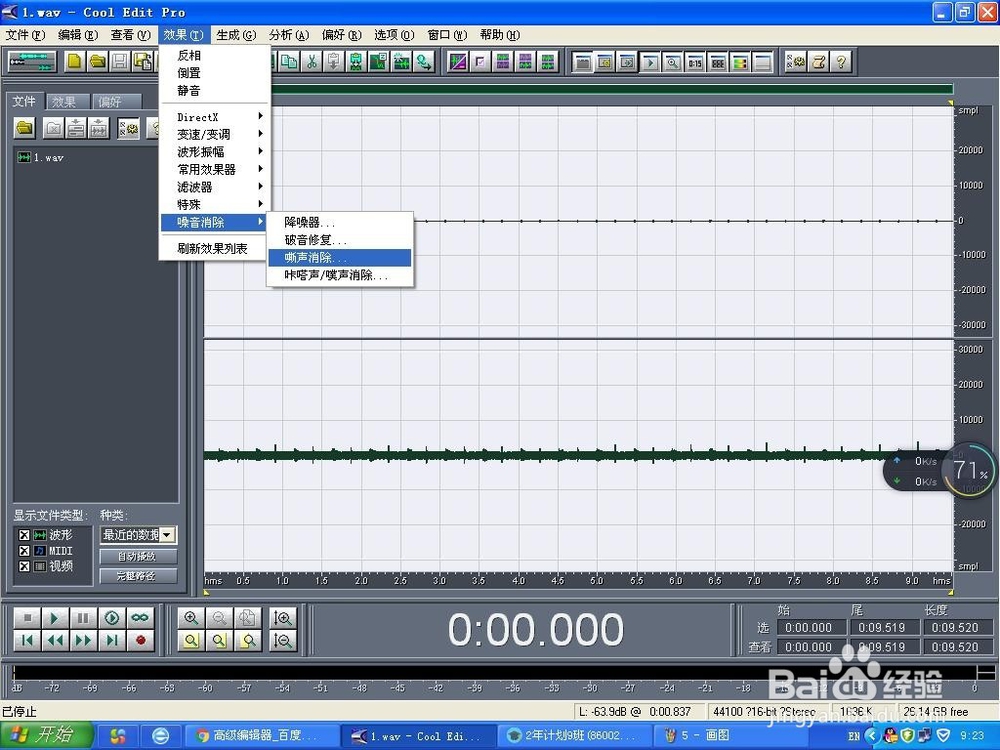
6、按确定;

7、开始消除噪声;

8、根据需要,再在效果中选取其它命令,如“降噪器”,继续进行噪声处理,直到满意为止。

时间:2026-04-23 10:45:09
1、安装好cool edit pro后,打开该软件,进入其主界面;
2、点击文件,选择打开命令;
3、找到需要去噪处理的音乐,选中它,然后按“打开”;
4、音频文件就导入到cool edit pro里了;
5、在效果菜单找到噪音消除,点“嘶声消除”;
6、按确定;
7、开始消除噪声;
8、根据需要,再在效果中选取其它命令,如“降噪器”,继续进行噪声处理,直到满意为止。
