PotPlayer怎么关闭以时间间隔处理搜索

 时间:2024-10-31 02:56:36

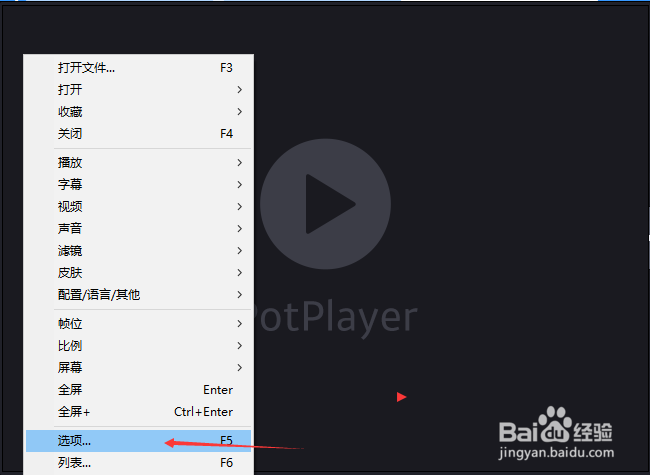
1、首先,点击左上角中更多选项

PotPlayer怎么关闭以时间间隔处理搜索

2、弹出了下拉菜单选择为选项

PotPlayer怎么关闭以时间间隔处理搜索

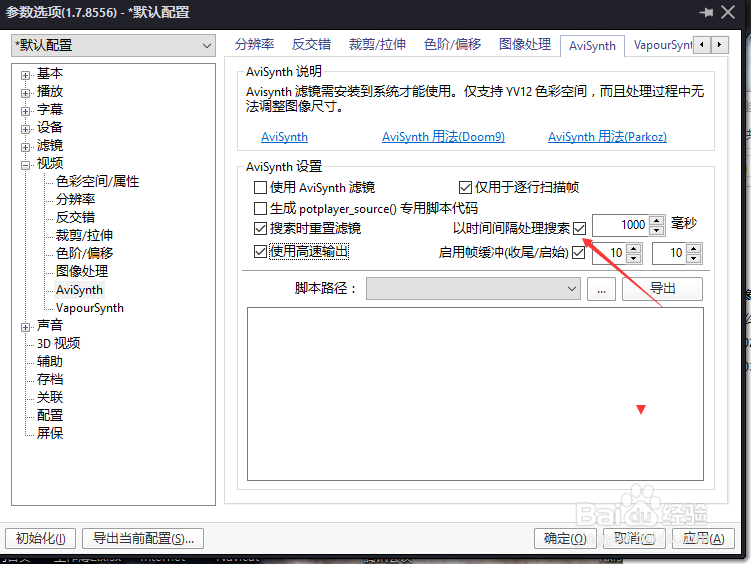
3、点击左侧中avisynth选项

PotPlayer怎么关闭以时间间隔处理搜索

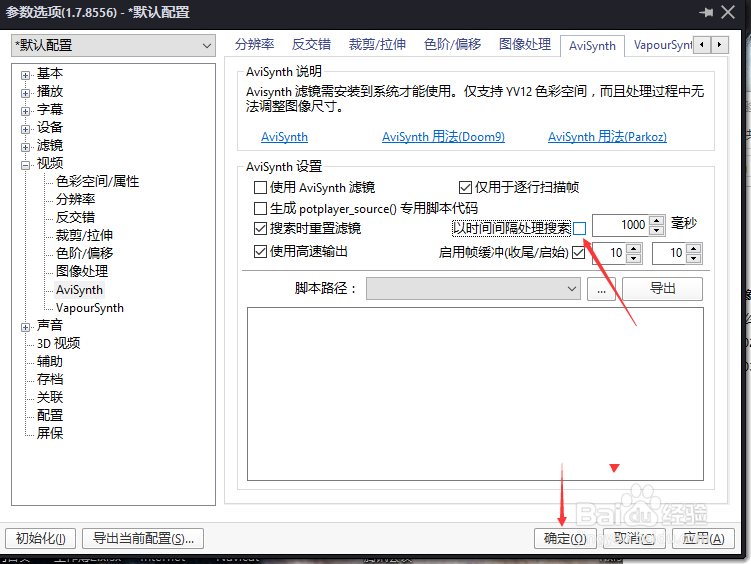
4、去掉勾选以时间间隔处理搜索选项

PotPlayer怎么关闭以时间间隔处理搜索

5、去掉勾选以时间间隔处理搜索选项之后,点击确定

PotPlayer怎么关闭以时间间隔处理搜索
  • PotPlayer怎么关闭在底部显示时间
  • PotPlayer怎么关闭仅全屏时处理
  • PotPlayer搜索完成后怎么设置不处理
  • PotPlayer字幕浏览器怎么关闭透明背景处理
  • PotPlayer怎么关闭明暗度处理
  • 热门搜索
    活螃蟹怎么保存 情人节用英语怎么说 汗管瘤的治疗方法 减压的方法 家常菜的做法 手机丢失支付宝怎么办 家常红烧牛肉 生意不好怎么办 表情包大全 婚礼请柬怎么写