如何设置Notepad++使用Windows(CRLF)格式行尾

 时间:2024-10-13 09:30:28

1、点击“Notepad++”

如何设置Notepad++使用Windows(CRLF)格式行尾

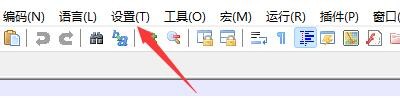
2、在“Notepad++”窗口中,点击“设置”

如何设置Notepad++使用Windows(CRLF)格式行尾

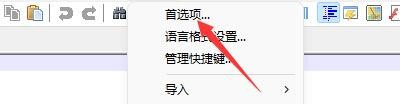
3、在弹出下拉栏中,点击“首选项”

如何设置Notepad++使用Windows(CRLF)格式行尾

4、在“首选项”窗口中,点击“新建”

如何设置Notepad++使用Windows(CRLF)格式行尾

5、在“新建”窗口中,找到“格式(行尾)”

如何设置Notepad++使用Windows(CRLF)格式行尾

6、在“格式(行尾)”栏目中,勾选“Windows(CRLF)”

如何设置Notepad++使用Windows(CRLF)格式行尾

7、点击“关闭”即可

如何设置Notepad++使用Windows(CRLF)格式行尾
  • IDEA中怎么设置免打扰模式下的左边距
  • powershell下怎么禁用和启用网络
  • Notepad++离线安装插件
  • QT经验:[1]Qt怎么修改本地文件的名字?
  • jenkins添加用户
  • 热门搜索
    嘴角长疱疹是什么原因 什么叫过渡句 无锡有什么好玩的地方 sphc是什么材料 晟读什么 2.0t是什么意思 做表格用什么软件 什么是plc nature是什么意思 pm2.5是什么意思