PotPlayer怎么设置在底部显示时间

 时间:2024-10-12 03:06:31

1、打开一个PotPlayer的界面中

PotPlayer怎么设置在底部显示时间

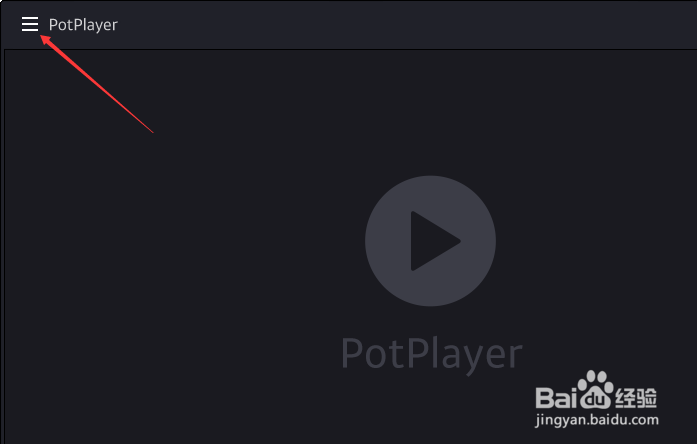
2、点击左上角中的更多

PotPlayer怎么设置在底部显示时间

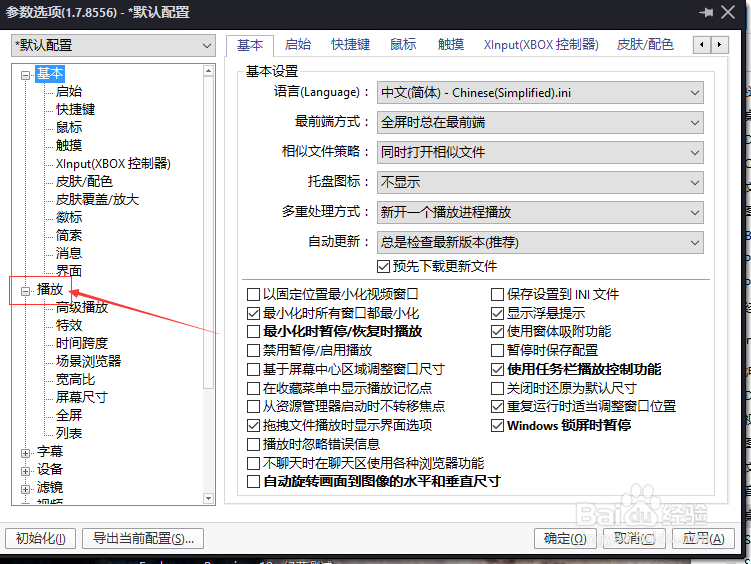
3、弹出了下拉菜单选中选项

PotPlayer怎么设置在底部显示时间

4、地奈左侧中播放选项

PotPlayer怎么设置在底部显示时间

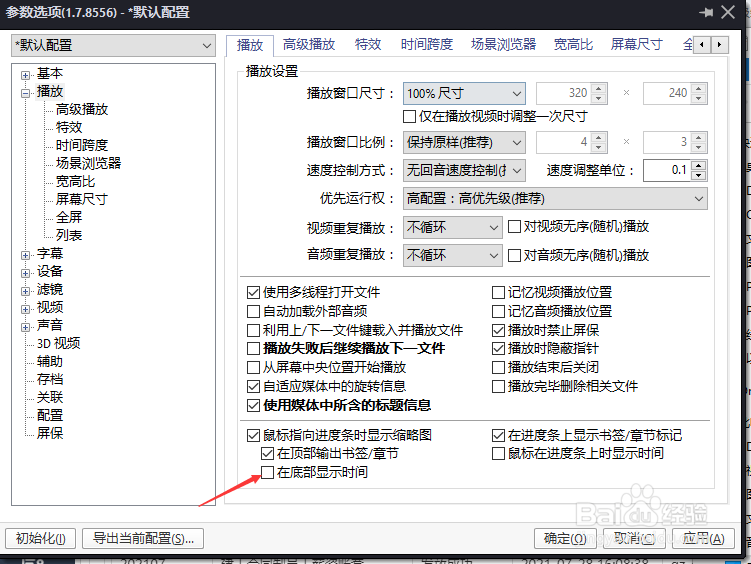
5、勾选在底部显示时间选项

PotPlayer怎么设置在底部显示时间

6、勾选在底部显示时间选项之后,点击确定

PotPlayer怎么设置在底部显示时间
  • Windows10隐藏快捷方式小箭头
  • PotPlayer怎么开启缩放窗口时保持宽高比
  • 如何禁止爱奇艺客户端根据大数据展示广告
  • PotPlaye如何选择无缝播放的使用方式?
  • win10下如何把网络文件夹创建为本地连接
  • 热门搜索
    帕劳旅游 美国旅游签证 山西的旅游景点 yy没声音怎么回事 lol蓝色精粹怎么获得 旅游英文 郑州师范学院怎么样 脸部痤疮怎么办 随手记怎么用 专升本可以报考哪些大学