PotPlayer怎么设置使用媒体中所含的标题信息

 时间:2026-04-22 07:05:51

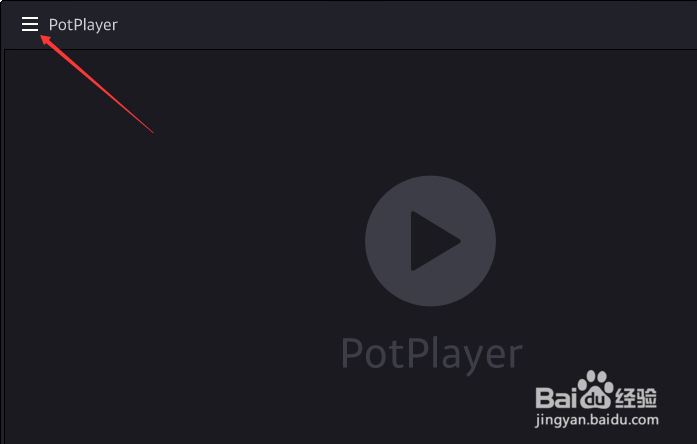
1、打开一个PotPlayer的界面中

PotPlayer怎么设置使用媒体中所含的标题信息

2、点击左上角中的更多

PotPlayer怎么设置使用媒体中所含的标题信息

3、弹出了下拉菜单选择为选项

PotPlayer怎么设置使用媒体中所含的标题信息

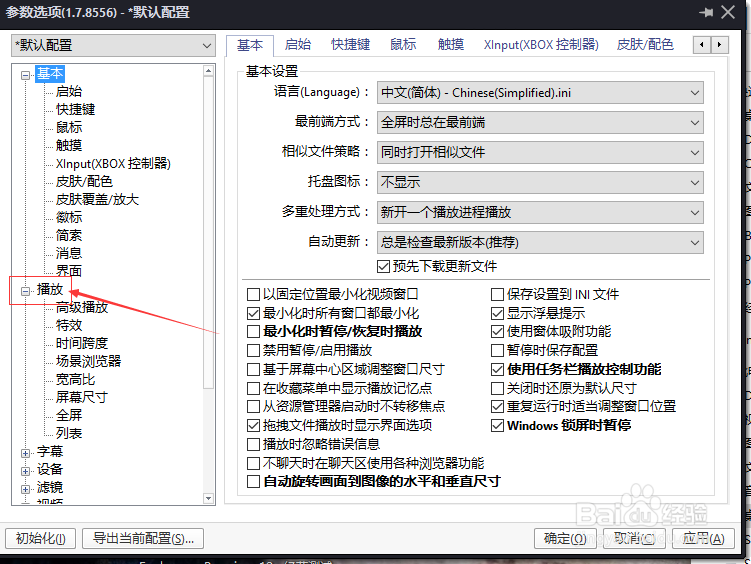
4、点击左侧中播放选项

PotPlayer怎么设置使用媒体中所含的标题信息

5、勾选使用媒体中所含的标题信息选项

PotPlayer怎么设置使用媒体中所含的标题信息

6、勾选使用媒体中所含的标题信息选项之后,点击确定

PotPlayer怎么设置使用媒体中所含的标题信息

  • apple store订阅怎么取消 iphone订阅怎么退订
  • Shotcut如何更改保存工程目录路径
  • 如何播放CSF文件
  • mkv和mp4什么区别
  • 如果配置参数来实现串口数据与can帧的互相转换
  • 热门搜索
    薤怎么读 锆怎么读 胸口隐隐作痛是怎么回事 萝卜干咸菜的做法 为什么家里不能养文竹 电脑配置怎么看 病毒感染是怎么引起的 夫妻宫怎么看 无线网怎么安装 阴虱是怎么得的