PotPlayer怎么设置默认场序为下图场优先

 时间:2026-04-23 07:14:28

1、首先,点击左上角中更多选项

PotPlayer怎么设置默认场序为下图场优先

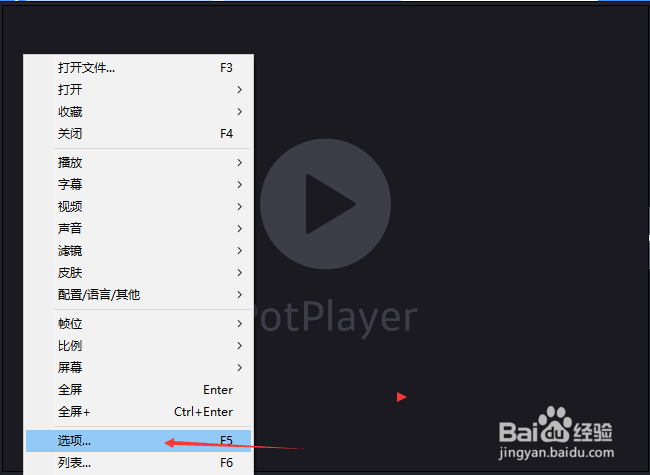
2、弹出了下拉菜单选择选项

PotPlayer怎么设置默认场序为下图场优先

3、点击左侧中反交错选项

PotPlayer怎么设置默认场序为下图场优先

4、点击默认场序选项

PotPlayer怎么设置默认场序为下图场优先

5、弹出了下拉菜单选择为下图场优先

PotPlayer怎么设置默认场序为下图场优先

6、选择为下图场优先之后,点击确定

PotPlayer怎么设置默认场序为下图场优先

  • 小米Pro15怎么打开单声道音频
  • PR软件经常卡顿怎么办?
  • a7sm2使用教程
  • 如何使用Win10系统自带Groove音乐播放器
  • edius时间码怎么去掉
  • 热门搜索
    脚垫怎么治 抖音怎么上热门 冰糖雪梨怎么做 竹子怎么画 甲沟炎怎么治 芝麻分怎么提高 星座怎么算 围棋怎么下 相宜本草的护肤品怎么样 蓝牙耳机怎么使用