PSPad editor怎么对后台编译开启

 时间:2026-02-18 06:20:51

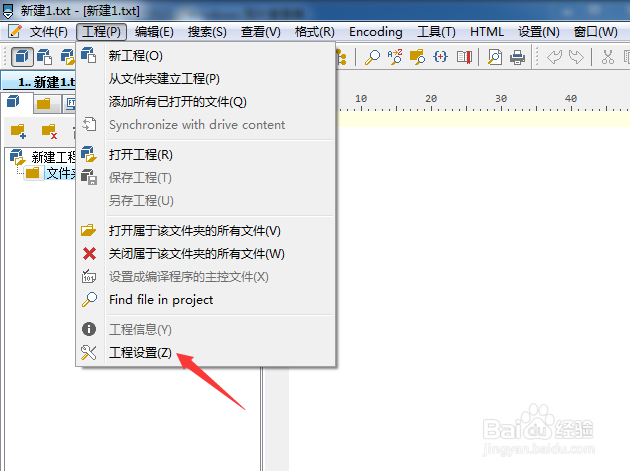
1、点击菜单中的工程菜单

PSPad editor怎么对后台编译开启

2、弹出了下拉菜单选中为工程设置选项

PSPad editor怎么对后台编译开启

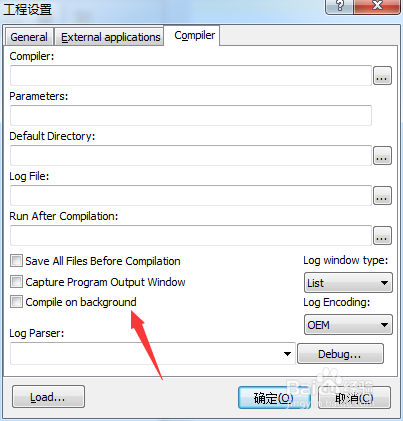
3、点击compile选项

PSPad editor怎么对后台编译开启

4、勾选上compile on background选项

PSPad editor怎么对后台编译开启

5、勾选上compile on background选项之后,点击确定
PSPad editor怎么对后台编译开启

  • PSPad editor怎么关闭在日志中跟踪编译进度
  • PSPad editor怎么关闭pspad前显示确认对话框
  • PSPad editor怎么菜单图标集为PSpad
  • PSPad editor怎么开启在文件中搜索
  • PSPad editor怎么关闭在日志中跟踪编译进度
  • 热门搜索
    盆腔炎是怎么引起的 水银体温计打碎了怎么处理 羽毛球用英语怎么说 有痔疮怎么办 粘鼠板的胶怎么去除 中暑怎么办 转氨酶高是怎么回事有什么危害 卤鸡爪的做法大全 qq怎么群发消息 怎么学好英语