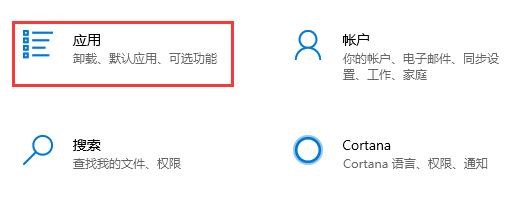
1、首先按下键盘“Win加i”打开设置面板,然后在其中选择“应用”。
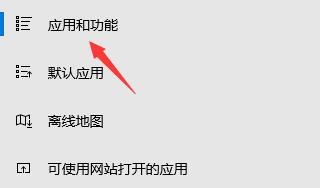
2、进入后在左边栏中进入“应用和功能”。
3、搜索到我们的软件后,选中它,然后点击右下角“卸载”。

4、接着会弹出应用卸载提示框,再点击“卸载”就可以将translucenttb卸载了。这样Translucenttb就完成卸载了。

时间:2026-04-29 10:08:41
1、首先按下键盘“Win加i”打开设置面板,然后在其中选择“应用”。
2、进入后在左边栏中进入“应用和功能”。
3、搜索到我们的软件后,选中它,然后点击右下角“卸载”。
4、接着会弹出应用卸载提示框,再点击“卸载”就可以将translucenttb卸载了。这样Translucenttb就完成卸载了。
