Windows Server 2003设置不允许用户安装软件

 时间:2024-10-12 09:44:12

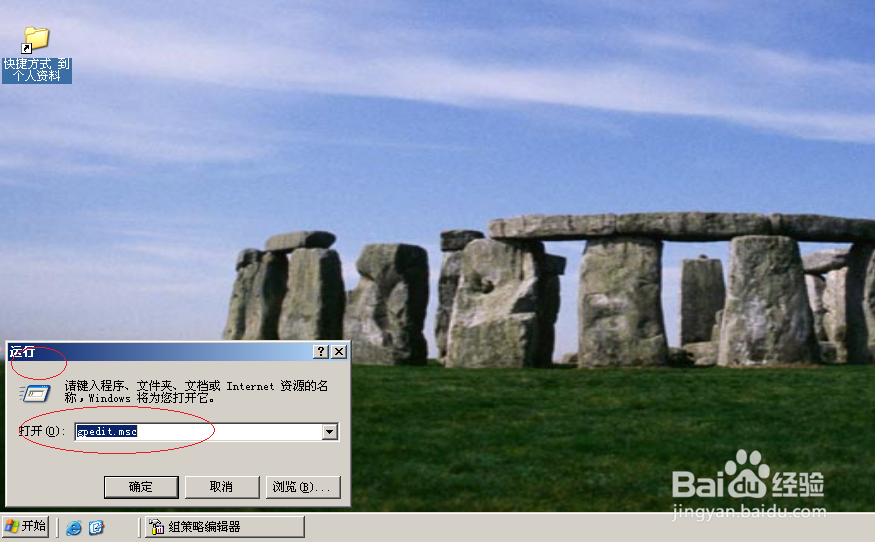
1、点击"开始"

Windows Server 2003设置不允许用户安装软件

2、选择"运行..."

Windows Server 2003设置不允许用户安装软件

3、文本框输入"gpedit.msc"

Windows Server 2003设置不允许用户安装软件

4、展开左侧文件夹

Windows Server 2003设置不允许用户安装软件

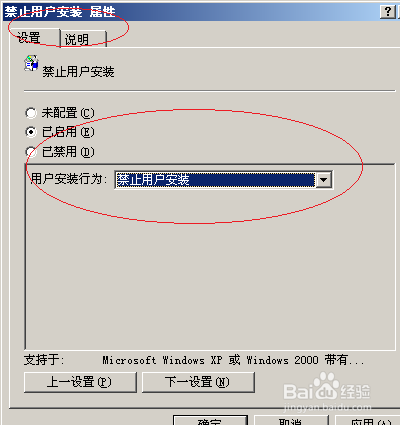
5、双击"禁止用户安装"

Windows Server 2003设置不允许用户安装软件

6、勾选"已启用"

Windows Server 2003设置不允许用户安装软件

7、完成设置,谢谢关注

Windows Server 2003设置不允许用户安装软件
  • Win10系统怎么关闭快速启动功能?
  • Chrome浏览器常用键盘快捷键介绍
  • Windows Server 2012 R2停止AD DS域控制器服务
  • 怎么开启硬盘写入缓存
  • 如何禁用组策略及如何恢复
  • 热门搜索
    蘑菇汤怎么做好吃 手机怎么换系统 东洋轮胎质量怎么样 林内燃气热水器怎么样 电脑怎么设置自动开机 岳飞是怎么死的 策划方案怎么写 燕麦粥怎么做 工作措施怎么写 excel中怎么换行