StarDict如何更改限制改变单词时间

 时间:2026-05-06 06:21:48

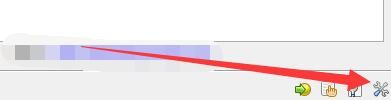
1、点击“StarDict”

StarDict如何更改限制改变单词时间

2、在“StarDict”窗口中,点击“设置”

StarDict如何更改限制改变单词时间

3、在“设置”窗口中,点击“输入”

StarDict如何更改限制改变单词时间

4、在“输入”窗口中,将“单词改变时限300毫秒”改为“200毫秒”

StarDict如何更改限制改变单词时间

5、点击“关闭”即可

StarDict如何更改限制改变单词时间

  • 如何设置StarDict输入播放声音文件命令
  • StarDict如何启用网络词典
  • StarDict如何更改取词修饰键
  • StarDict如何清空所有缓存文件
  • 如何设置StarDict启用即输即查功能
  • 热门搜索
    沙哑的近义词 吸引的近义词 符号勾怎么打出来 怎么折花朵 风寒感冒的症状 华硕手机怎么样 养老保险个人怎么交 牛肉丸子怎么做好吃 简历表格怎么做 怎么装修房子