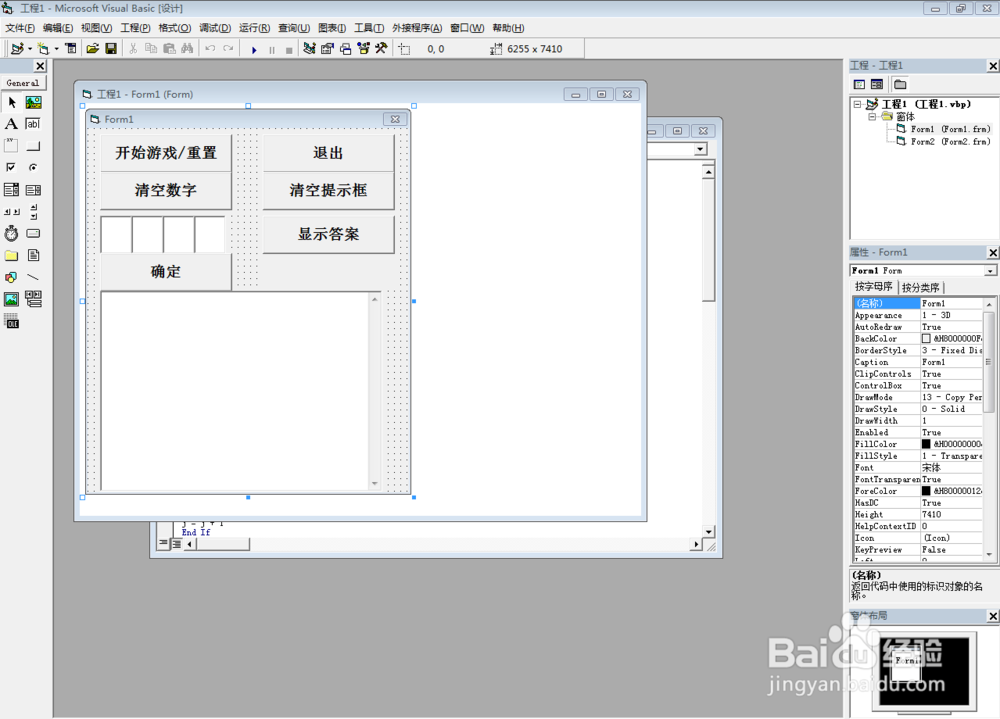
1、打开vb6.0,如图设计Form1界面
Form1 的 BorderStyle属性设为3-……
Command1 为 开始游戏/重置
Command2 为 确定
Command3 为 退出
Command4 为 显示答案
Command5 为 清除数字
Command6 为 清空提示框
Text1至4 为 依次从左到右的4个输入框,设Font属性为宋体,加粗,四号
Text5 为 大提示框,Scrollbars属性设置为2-Vertical,MultiLine 属性为true
Label1 为 显示答案的提示框
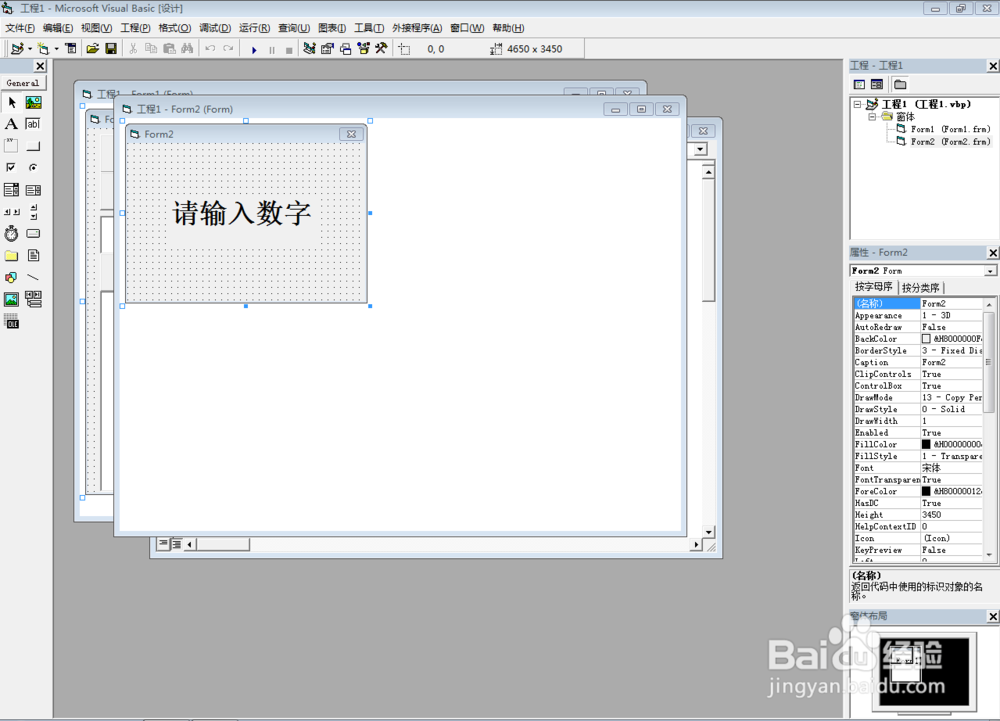
2、添加Form2
Form1 的 BorderStyle属性设为3-……
Label1的Caption改为 请输入数字
Font属性为宋体,加粗,一号
3、Form1中输入代码
Private Sub Command2_Click()
Dim h As Integer, j As Integer
h = 0
j = 0
If Text1.Text = "" Or Text2.Text = "" Or Text3.Text = "" Or Text4.Text = "" Then
Form2.Show
Else
Open "C:\Users\Administrator\Documents\游戏.txt" For Input As #1
d = Input(1, #1)
e = Input(1, #1)
f = Input(1, #1)
g = Input(1, #1)
If d <> Text1.Text Then
h = h
Else: h = h + 1
End If
If e <> Text2.Text Then
h = h
Else: h = h + 1
End If
If f <> Text3.Text Then
h = h
Else: h = h + 1
End If
If g <> Text4.Text Then
h = h
Else: h = h + 1
End If
If d = Text1.Text Or d = Text2.Text Or d = Text3.Text Or d = Text4.Text Then
j = j + 1
End If
If e = Text1.Text Or e = Text2.Text Or e = Text3.Text Or e = Text4.Text Then
j = j + 1
End If
If f = Text1.Text Or f = Text2.Text Or f = Text3.Text Or f = Text4.Text Then
j = j + 1
End If
If g = Text1.Text Or g = Text2.Text Or g = Text3.Text Or g = Text4.Text Then
j = j + 1
End If
Text5.Text = Text5.Text & "有" & h & "个位置对了," & "包含" & j & "个相同数字" & vbCrLf
End If
Close
End Sub
Private Sub Command3_Click()
End
End Sub
Private Sub Command1_Click()
Dim w As Integer
Dim x As Integer
Dim y As Integer
Dim z As Integer
Text1.Text = ""
Text2.Text = ""
Text3.Text = ""
Text4.Text = ""
Label1 = ""
Text5.Text = ""
Dim b As String
a = a + 1
Randomize
If a = 0 Then
Command2.Enabled = False
Else
Command2.Enabled = True
End If
w = Int(Rnd() * 9 + 1)
x = Int(Rnd() * 9 + 1)
y = Int(Rnd() * 9 + 1)
z = Int(Rnd() * 9 + 1)
Do While w = x Or w = y Or w = z Or x = y Or x = z Or y = z
w = Int(Rnd() * 9 + 1)
x = Int(Rnd() * 9 + 1)
y = Int(Rnd() * 9 + 1)
z = Int(Rnd() * 9 + 1)
Loop
b = w * 1000 + x * 100 + y * 10 + z
Open "C:\Users\Administrator\Documents\游戏.txt" For Output As #1
Print #1, b
Close
End Sub
Private Sub Command4_Click()
Dim i As Single
Open "C:\Users\Administrator\Documents\游戏.txt" For Input As #1
i = Input(4, #1)
Label1 = i
Close
End Sub
Private Sub Command5_Click()
Text1.Text = ""
Text2.Text = ""
Text3.Text = ""
Text4.Text = ""
End Sub
Private Sub Command6_Click()
Label1 = ""
Text5.Text = ""
End Sub
Private Sub Form_Load()
Dim a As Integer
If a = 0 Then
Command2.Enabled = False
Else
Command2.Enabled = True
End If
End Sub
4、打开“文档”,新建txt文档,重命名“游戏”
