Vectornator版本号在哪查看

 时间:2024-10-13 13:44:04

1、打开Vectornator,进入之后,选择点击页面的返回图标

Vectornator版本号在哪查看

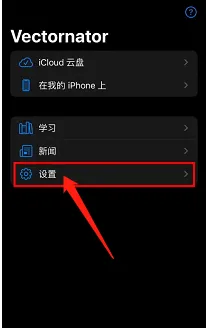
2、进入之后,选择点击页面下面的设置选项

Vectornator版本号在哪查看

3、进入之后,在页面,即可看到软件版本号,如下图所示

Vectornator版本号在哪查看
  • Vectornator怎么开启CMYK预览
  • Vectornator如何创建A4画布
  • Vectornator如何查看软件版本号
  • Vectornator怎么开启画布旋转
  • Vectornator如何开启画布旋转
  • 热门搜索
    怎么制作ppt 实习目的怎么写 怎么赚钱快 殷怎么读 醋溜白菜怎么做 胃酸过多怎么办 微信不显示聊天怎么找回来 小说开头怎么写 怀孕咳嗽怎么办 暂住证怎么办理