DzSoft PHP Editor怎么关闭智能标签

 时间:2026-04-29 22:31:16

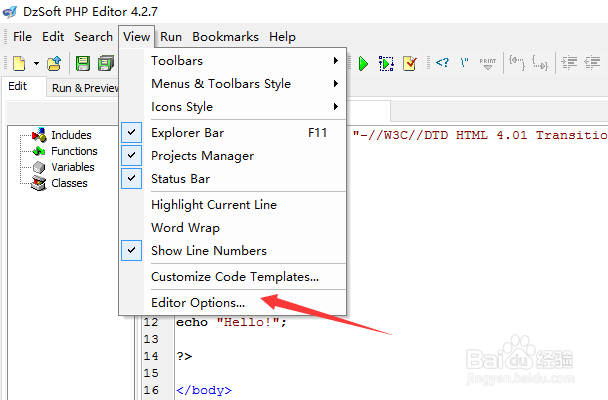
1、点击菜单中view菜单

DzSoft PHP Editor怎么关闭智能标签

2、弹出了下拉菜单选择为editor options选项

DzSoft PHP Editor怎么关闭智能标签

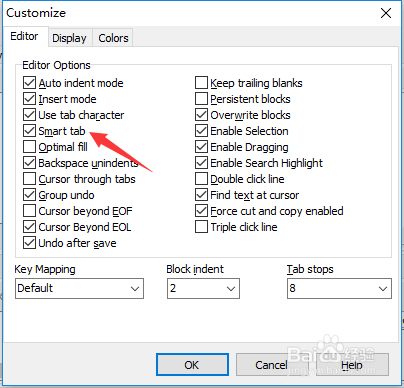
3、点击editor选项

DzSoft PHP Editor怎么关闭智能标签

4、去掉勾选smart tab选项

DzSoft PHP Editor怎么关闭智能标签

5、去掉勾选smart tab选项之后,点击ok按钮

DzSoft PHP Editor怎么关闭智能标签

  • DzSoft PHP Editor怎么关闭使用制表符
  • DzSoft PHP Editor怎么关闭在光标处查找文本
  • DzSoft PHP Editor怎么关闭缩进模式
  • DzSoft PHP Editor怎么设置光标通过选项卡
  • DzSoft PHP Editor怎么设置缩进模式
  • 热门搜索
    零存整取利息怎么算 肤色暗沉发黄怎么调理 ps怎么新建图层 芒果怎么吃 then怎么读 嗓子哑了怎么办 比瑞吉狗粮怎么样 怎么看黄片 自我介绍怎么写 饺子馅怎么调才好吃