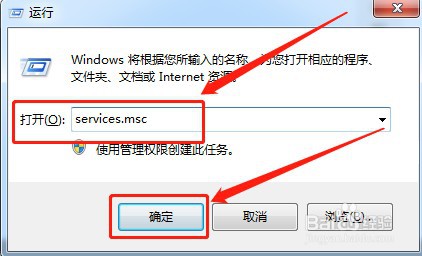
1、打开“运行”,输入“services.msc”,如下图所示:
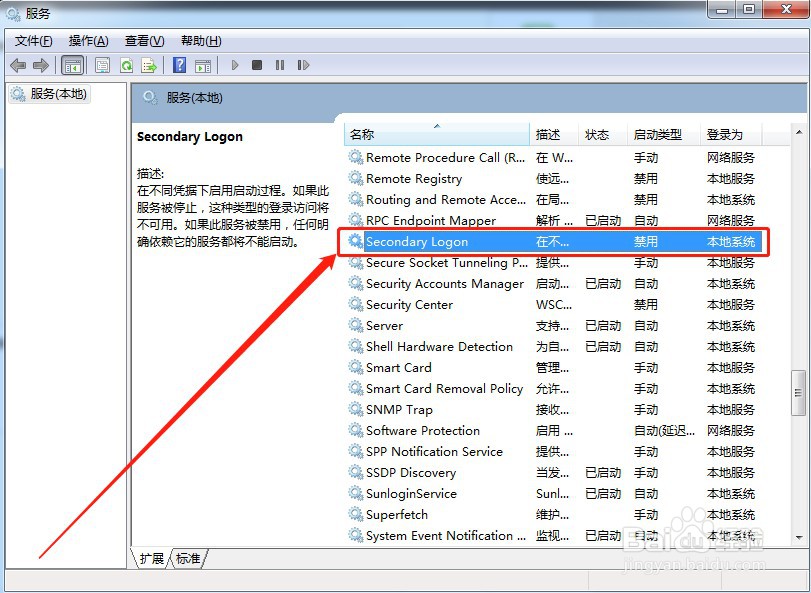
2、双击“Secondary Logon”选项,如下图所示:
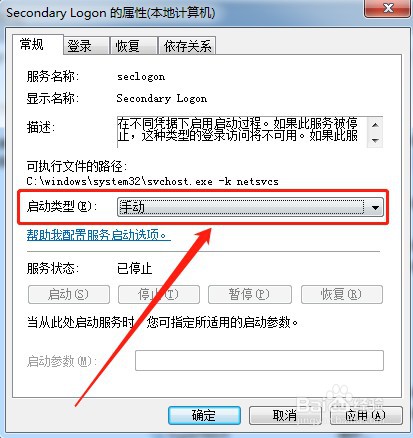
3、将“启动类型”设置为“手动”,如下图所示:
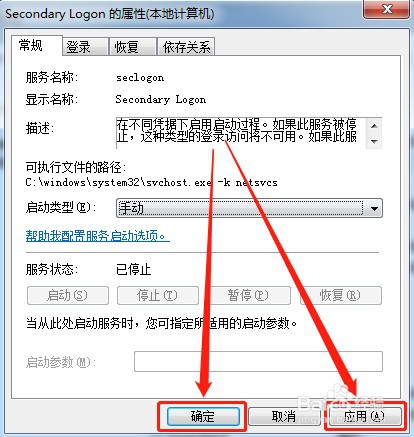
4、点击“应用”“确定”即可,如下图所示:
1、【1】打开“运行”,输入“services.msc”
【2】双击“Secondary Logon”选项
【3】将“启动类型”设置为“手动”
【4】点击“应用”“确定”即可
时间:2026-04-22 03:59:24
1、打开“运行”,输入“services.msc”,如下图所示:
2、双击“Secondary Logon”选项,如下图所示:
3、将“启动类型”设置为“手动”,如下图所示:
4、点击“应用”“确定”即可,如下图所示:
1、【1】打开“运行”,输入“services.msc”
【2】双击“Secondary Logon”选项
【3】将“启动类型”设置为“手动”
【4】点击“应用”“确定”即可
