1、点击开始,找到控制面板

2、点击控制面板,找到程序
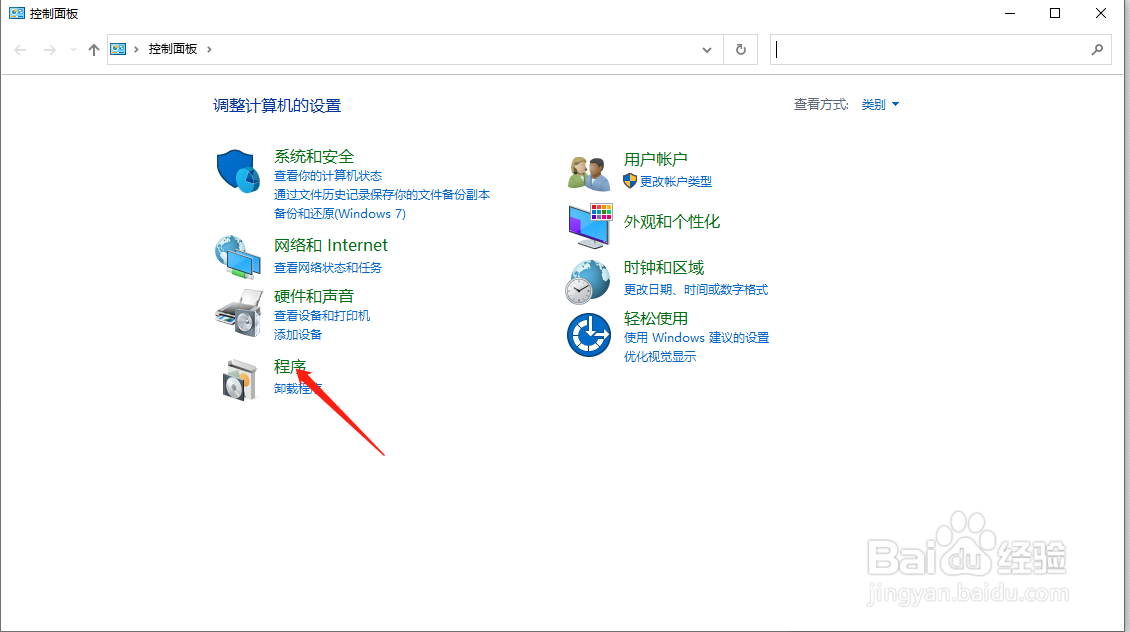
3、点击程序,找到启用或关闭Windows功能

4、点击启用或关闭Windows功能
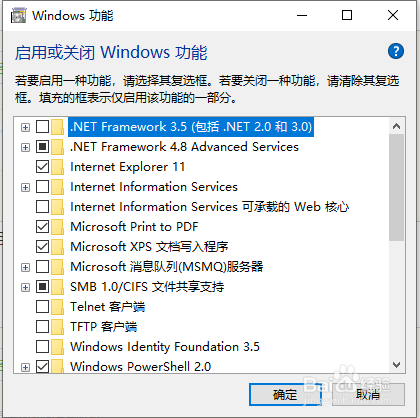
5、向下拖动右边滚动条,找到Internet Explorer 11

6、点击Internet Explorer 11前面复选框的√,这样会有个提示,点击确定

7、点击 是

8、点击确定,系统会出现如下图所示,等待更新完成,Windows会掉IE11,重新启动一下电脑就生效了。

时间:2026-04-27 02:56:12
1、点击开始,找到控制面板
2、点击控制面板,找到程序
3、点击程序,找到启用或关闭Windows功能
4、点击启用或关闭Windows功能
5、向下拖动右边滚动条,找到Internet Explorer 11
6、点击Internet Explorer 11前面复选框的√,这样会有个提示,点击确定
7、点击 是
8、点击确定,系统会出现如下图所示,等待更新完成,Windows会掉IE11,重新启动一下电脑就生效了。
