DzSoft PHP Editor怎么设置光标超出eof

 时间:2024-10-31 12:29:28

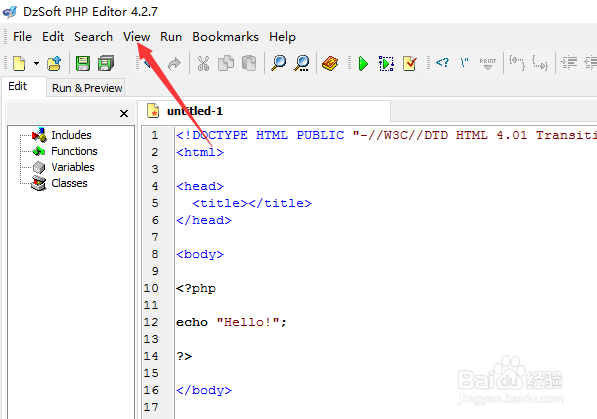
1、点击菜单中view选项

DzSoft PHP Editor怎么设置光标超出eof

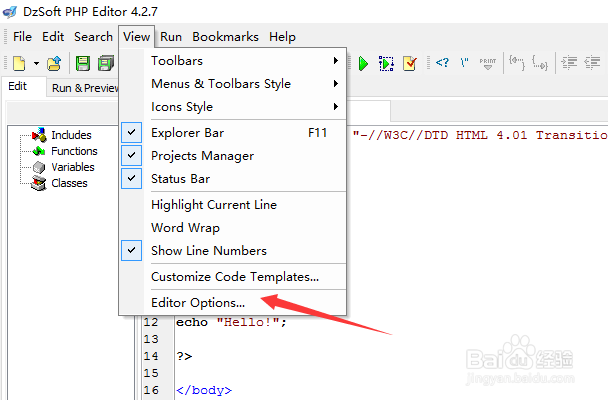
2、弹出了下拉菜单选择为editor optionsx选项

DzSoft PHP Editor怎么设置光标超出eof

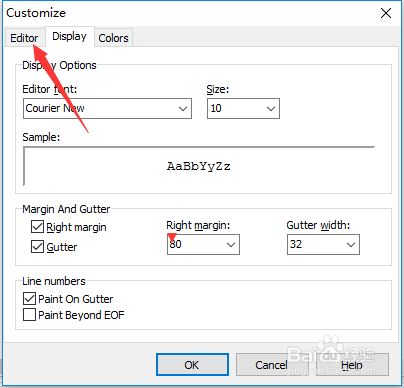
3、点击editor

DzSoft PHP Editor怎么设置光标超出eof

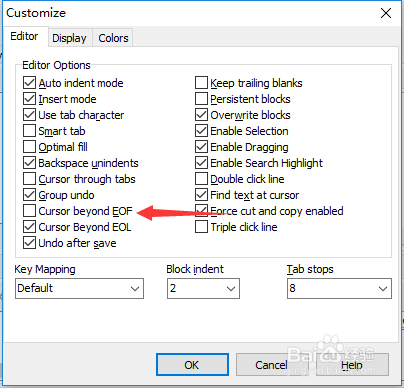
4、勾选cursor Beyond eof选项

DzSoft PHP Editor怎么设置光标超出eof

5、勾选cursor Beyond eof选项之后,点击ok

DzSoft PHP Editor怎么设置光标超出eof
  • Crimson editor怎么按用户分隔设置
  • Crimson editor怎么打印页脚设置
  • Crimson editor怎么设置显示行号
  • DzSoft PHP Editor怎么关闭缩进模式
  • DzSoft PHP Editor怎么设置自动缩进模式
  • 热门搜索
    拉链坏了怎么修 鱼怎么养 痰里有血是怎么回事 95酒精怎么配成75 怎么唱高音 苹果手机怎么备份照片 泣怎么读 架构图怎么做 我的世界剪刀怎么做 皮肤暗黄怎么调理能变白