Windows10卸载(删除)Internet Explorer

 时间:2026-04-26 20:59:29

1、单击开始菜单中的“齿轮”图标。

Windows10卸载(删除)Internet Explorer

2、点击“应用“。

Windows10卸载(删除)Internet Explorer

3、应用程序和功能。单击“可选功能”。

Windows10卸载(删除)Internet Explorer

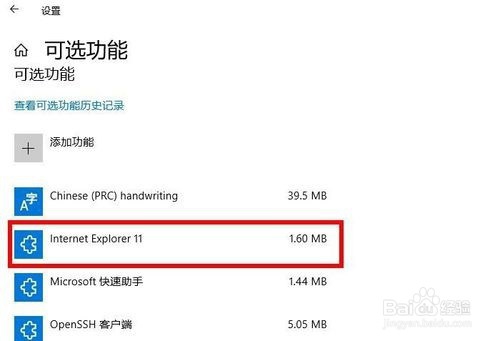
4、可选功能里,点击“ Internet Explorer”。

Windows10卸载(删除)Internet Explorer

5、点击“卸载”。

Windows10卸载(删除)Internet Explorer

6、很快就删除完了。这样就完成了Internet Explorer的卸载(删除)。

Windows10卸载(删除)Internet Explorer

  • centos 系统备份
  • 怎样查看windows的CPU是arm架构还是x86架构?
  • awvs如何批量导出报告
  • Win10如何解决开机出现chkdsk磁盘检测的问题
  • 电脑桌面图标丢失explorer运行无效?
  • 热门搜索
    皮包脏了怎么清洗 暴风魔镜怎么样 哪里整容好 火火兔怎么下载歌曲 如何瘦手臂 峨眉山旅游路线 如何了解一个人 如何养仓鼠 如何瘦胸 神奇的动物在哪里