PowerShape怎么关闭转换全部曲面为powersurface

 时间:2024-10-14 20:26:12

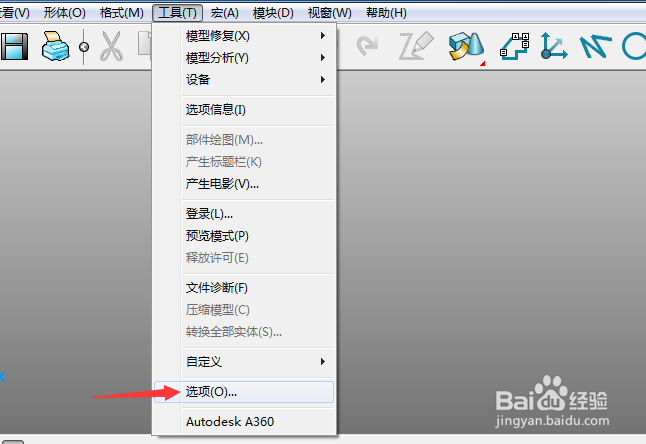
1、首先,点击菜单中的工具菜单,弹出了下拉菜单选中为选项

PowerShape怎么关闭转换全部曲面为powersurface

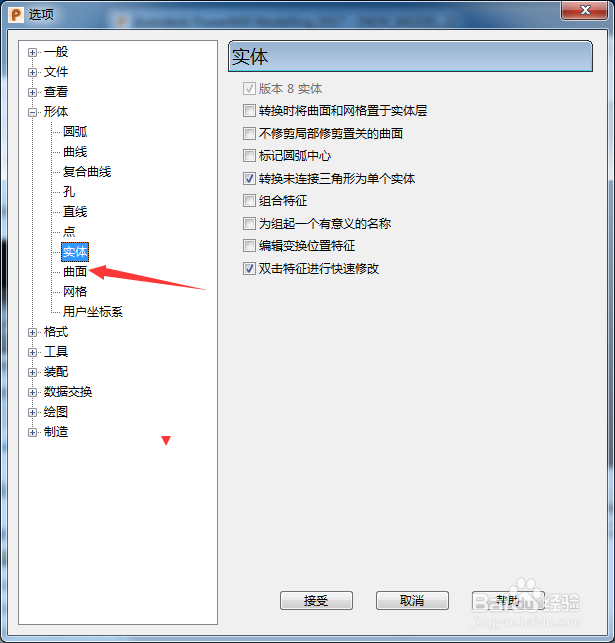
2、点击左侧中曲面选项

PowerShape怎么关闭转换全部曲面为powersurface

3、去掉勾选上转换全部曲面为powersurface选项

PowerShape怎么关闭转换全部曲面为powersurface

4、去掉勾选上转换全部曲面为powersurface选项之后,点击接受按钮
PowerShape怎么关闭转换全部曲面为powersurface
  • Solidworks中怎么调出工具栏
  • SW 2019如何设置分割周期面
  • Solidworks如何设置边线法兰为虚拟交点的折弯
  • SW如何设定边角特定缝隙
  • Solidworks2016软件怎么利用异型孔向导设计孔?
  • 热门搜索
    准生证怎么办 过敏性湿疹怎么治疗 炒股怎么开户 邮箱地址怎么填 宫外孕怎么治疗最好 白萝卜怎么腌制好吃 怎么查自己手机号码 谢谢用日语怎么说 脸上过敏怎么办 手机怎么挂vpn