Snagit 2019 Editor怎么关闭启用拼写检查

 时间:2026-04-25 06:01:43

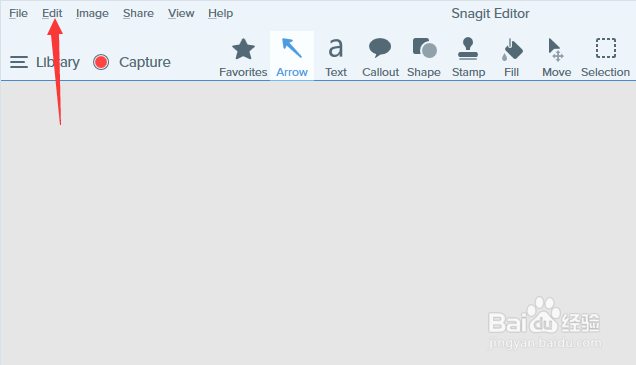
1、首先,点击菜单中的edit菜单

Snagit 2019 Editor怎么关闭启用拼写检查

2、弹出了下拉菜单选中为edit preferences选项

Snagit 2019 Editor怎么关闭启用拼写检查

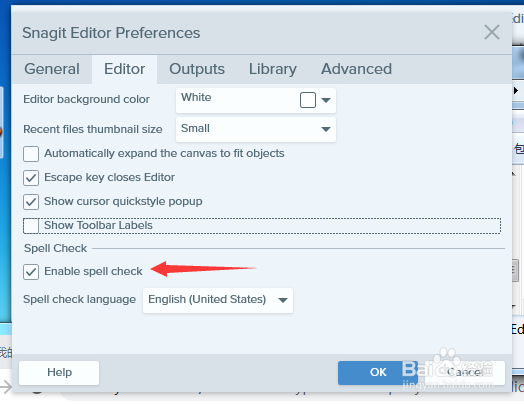
3、去掉勾选上enable spell check选项

Snagit 2019 Editor怎么关闭启用拼写检查

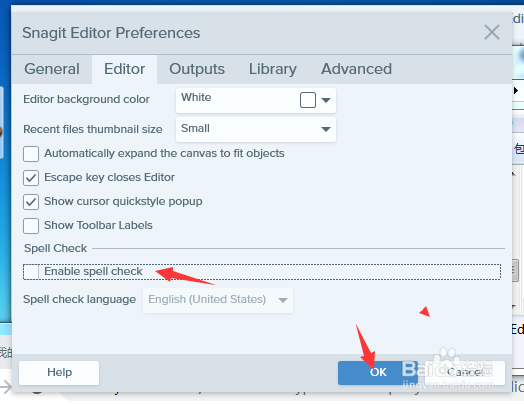
4、去掉勾选上enable spell check选项之后,点击ok按钮

Snagit 2019 Editor怎么关闭启用拼写检查

  • Snagit怎么设置最近的文件缩略图大小为最小
  • Snagit 2019怎么关闭自动展开画布以适合对象
  • Snagit 2019 Editor怎么设置编辑器背景色为白色
  • Snagit 2019 Editor怎么关闭发送匿名使用数据
  • Snagit怎么滚动截屏
  • 热门搜索
    网线怎么接 富贵包怎么形成的 安满孕妇奶粉怎么样 痣是怎么形成的 我的世界电梯怎么做 仝卓怎么读 微信号怎么申请 微信公众号怎么运营 英语怎么写 猪皮冻怎么做好吃